Sage 200 integration looks straightforward until you find out your customer is running the on-premise Professional edition with no public API endpoint and a firewall nobody documented — a discovery that tends to happen on a Friday afternoon. If you're planning to build this connector, or deciding whether to build it at all, here's what the architecture actually looks like across different deployment types.
TLDR:
- Sage 200 serves UK mid-market manufacturers and distributors in two editions: cloud Standard and on-premise Professional, each requiring a different connector architecture.
- On-premise Sage 200 Professional has no public API endpoint, so your integration needs a proxy inside the customer's network to reach the data.
- Custom ERP integrations exceed budget or timeline 50-75% of the time, with 40% of engineering time going to fixes instead of new builds.
- Scaling past a handful of tenants requires fully isolated per-tenant state, credentials, and job history or one broken sync contaminates your debugging across the board.
- Hotglue connects to Sage 200 via a cloud proxy with bidirectional sync across products, sales orders, invoices, and credit notes, priced per active tenant and not by data volume.
What Sage 200 Is and Who Uses It
Sage 200 is a finance and business management solution built for UK small and medium-sized businesses that have outgrown Sage 50 but aren't ready for a full Tier 1 ERP. It sits in the mid-market, serving manufacturers, distributors, and wholesalers who need more than basic accounting without the complexity of SAP or Oracle.
It comes in two editions. Sage 200 Standard is cloud-native, hosted on Sage's own servers, and suited for smaller teams with straightforward needs. Sage 200 Professional goes further, supporting CRM, manufacturing, business intelligence, and project accounting, and also offers an on-premise deployment option.
That deployment difference is where things get interesting for B2B SaaS teams building ERP integrations.
The Sage 200 API: How It Actually Works
Sage 200 exposes a REST-based API for both Standard Online and Professional editions, with separate API references for Sage 200 Standard and Sage 200 Professional on the Sage Developer Portal. Authentication runs over OAuth, and developers interact with it through standard HTTP methods. The API covers financial data, stock management, sales orders, customers, and more.
Standard and Professional have separate API references. They share a similar structure, but the Professional edition's broader module set means more endpoints, more objects, and more edge cases to handle.
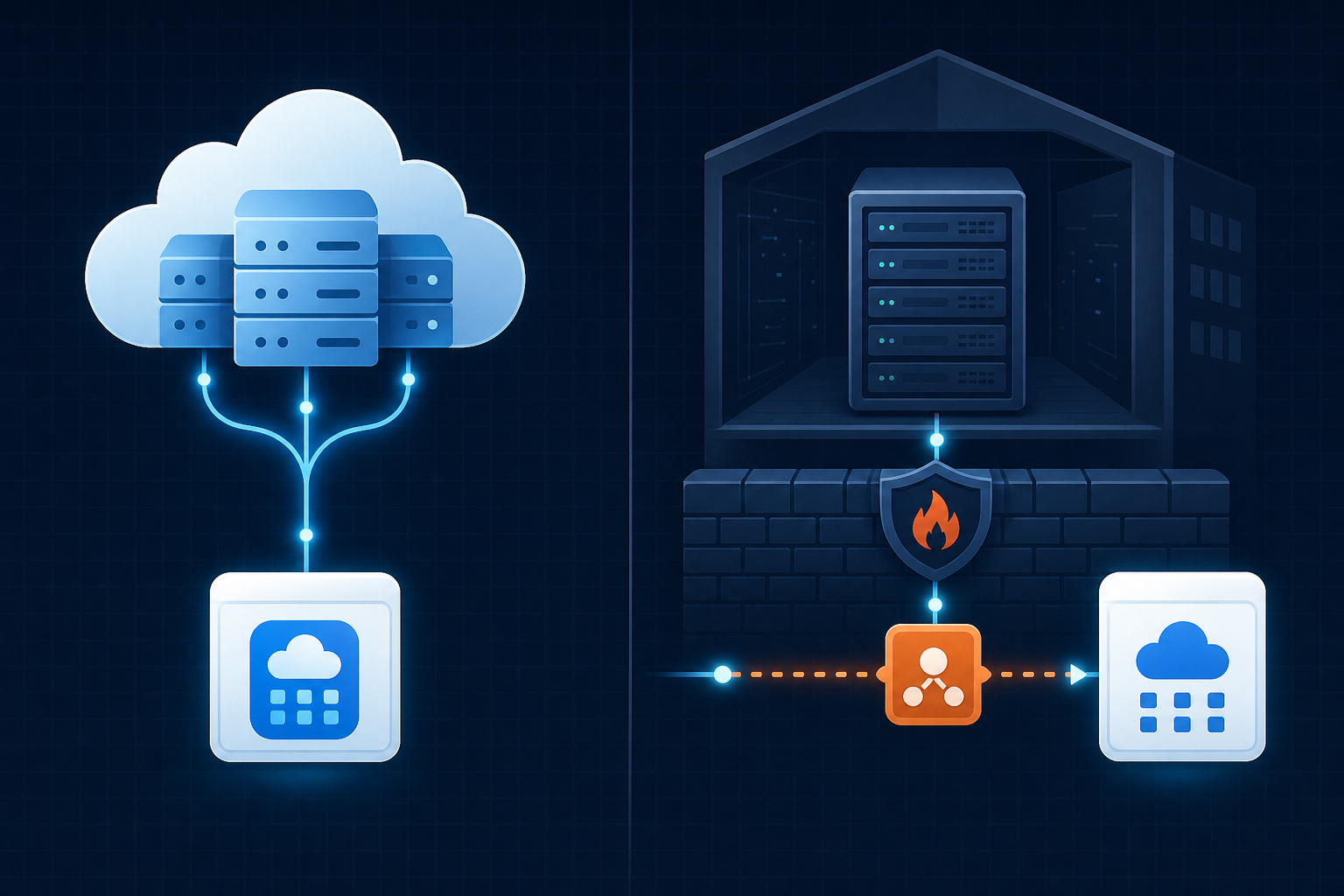
The on-premise deployment of Sage 200 Professional adds another layer. Cloud-native API calls alone won't reach it. You need a proxy or local connector sitting between your SaaS product and the customer's on-premise environment to make the data accessible. That gap is where most integration plans quietly fall apart.
Common Sage 200 Integration Use Cases
CPOs and partnership leads at B2B SaaS companies tend to field the same Sage 200 integration requests over and over, each one tied to a specific data gap their customers are dealing with daily. (Yes, the spreadsheet reconciliation complaints are always involved.)
- CRM sync (Salesforce, HubSpot, and other top CRMs): Sales teams close deals in CRM, but finance only sees revenue in Sage. Customers end up with duplicate records and no shared source of truth on AR or payment status.
- E-commerce and marketplaces (Shopify, Amazon): Orders flow in from multiple channels, but inventory and invoicing live in Sage. Without a sync, reconciliation becomes a manual spreadsheet exercise every week.
- AP automation and payments (Tipalti, Airwallex): Finance teams need bills, vendors, and payment status moving bidirectionally between Sage and other accounting platforms and their AP tool. One-way pushes create reconciliation gaps fast.
- BI and data warehouses: Sage holds the financial record of truth, but reporting tools need structured exports on a schedule. Most customers resort to CSV exports until something breaks.
The pattern is consistent: Sage is the authoritative system for finance, but every other tool in the stack needs to talk to it.
Sage 200 Standard vs. Professional: Integration Implications
The version your customers run determines your entire connector architecture, and getting this wrong early costs weeks of engineering time that nobody budgeted for. This is typically a decision that lands on the CPO or Head of Partnerships: you're the one who committed to the integration on the roadmap, so you're the one who needs to know what you're actually building.
| Factor | Sage 200 Standard | Sage 200 Professional (On-Premise) |
|---|---|---|
| Hosting | Cloud-hosted by Sage | Customer's own servers |
| Public API endpoint | Yes, reachable directly | No, requires local proxy or agent |
| Authentication | Standard OAuth out of the box | Custom credential handling per customer |
| Network access | Standard HTTPS API calls | Requires network-level access inside customer environment |
| Firewall complexity | None | Varies per customer; must be handled individually |
| Module set | Core finance and stock | CRM, manufacturing, BI, project accounting, and more |
| Connector complexity | Relatively conventional | Much higher: proxy layer required |
Sage 200 Standard is cloud-hosted by Sage. OAuth authentication works out of the box, and your API calls reach the data directly. Connector design here is relatively conventional.
Sage 200 Professional on-premise is a different story. There is no public endpoint to hit. A proxy or local agent has to sit inside the customer's network, bridge the connection, and expose the data in a way your integration can consume. That means:
- Authentication cannot rely on standard OAuth alone, requiring more custom credential handling per customer.
- The connector must handle network-level access beyond API credentials, which adds meaningful infrastructure overhead.
- Each customer's environment may have different firewall or proxy configurations that your connector needs to account for individually.
Partner Cloud-hosted Professional deployments behave closer to Standard, but you cannot assume which deployment type your customers run. If you are building for a UK manufacturing or distribution customer base, assume a meaningful share will be on-premise Professional.
Methods for Building a Sage 200 Integration
Three structural paths exist for Sage 200 integration, each with real trade-offs.
- Point-to-point direct API integration: Your engineers call the Sage 200 API directly. Fast to ship for one customer, but every new tenant brings schema variations, credential differences, and deployment surprises. Maintenance compounds quickly.
- Custom middleware layer: A shared service sits between your product and Sage, handling auth and bidirectional data transformation centrally. More maintainable than point-to-point, but building and maintaining it consumes real engineering headcount, especially once on-premise Professional deployments enter the picture.
- Embedded integration layer: Connector logic lives inside your product's infrastructure, scoped per tenant, with shared transformation logic reused across customers. Higher upfront investment to architect correctly, but the only path that scales across dozens of tenants without rebuilding per customer.
The Hidden Costs of Building Sage 200 Integrations In-House
The math on in-house Sage 200 integration looks reasonable until you're six months in. The initial build is rarely where the cost lives: it's the ongoing maintenance, versioning, and per-customer debugging that quietly consumes engineering capacity that was never budgeted for it.
Sage 200 Professional compounds this. Each customer instance can have schema variations, different module configurations, and firewall setups your connector has never seen. What works for tenant one breaks for tenant four, and the fix is rarely reusable.
The ongoing costs stack fast:
- API versioning: Sage ships updates regularly, so your connector needs to track endpoint changes and migrate before customers notice failures.
- State management: Incremental sync requires storing cursors per tenant, and getting the logic wrong means you either miss records or flood the API.
- Write failures: Silent write errors are common, and without explicit failure handling and retry logic, data discrepancies accumulate invisibly.
- On-premise environments: Multi-user Professional deployments may have session conflicts or connection limits your cloud-side code cannot anticipate.
The hidden cost nobody budgets is the second engineer. The first ships the connector. The second spends the next year keeping it alive while the first moves on to roadmap work that actually grows the product.
On-Premise Sage 200 Professional: A Separate Integration Challenge
On-premise Sage 200 Professional has no public API endpoint reachable from outside the customer's network. You can't authenticate via OAuth and start pulling data. Something has to live inside the customer's environment first.
That something is a local agent or proxy, installed on the customer's server, that bridges their Sage instance to your product. Hotglue handles this via a cloud proxy approach for Sage 200, which keeps the connector resilient to local software updates without requiring customers to manage connection infrastructure themselves.
Scaling Sage 200 Integrations Across Multiple Tenants
One working Sage 200 integration and fifty working Sage 200 integrations are genuinely different problems. The first proves you can connect. The second proves your architecture can handle customers who each bring their own version, module configuration, custom fields, and network setup.
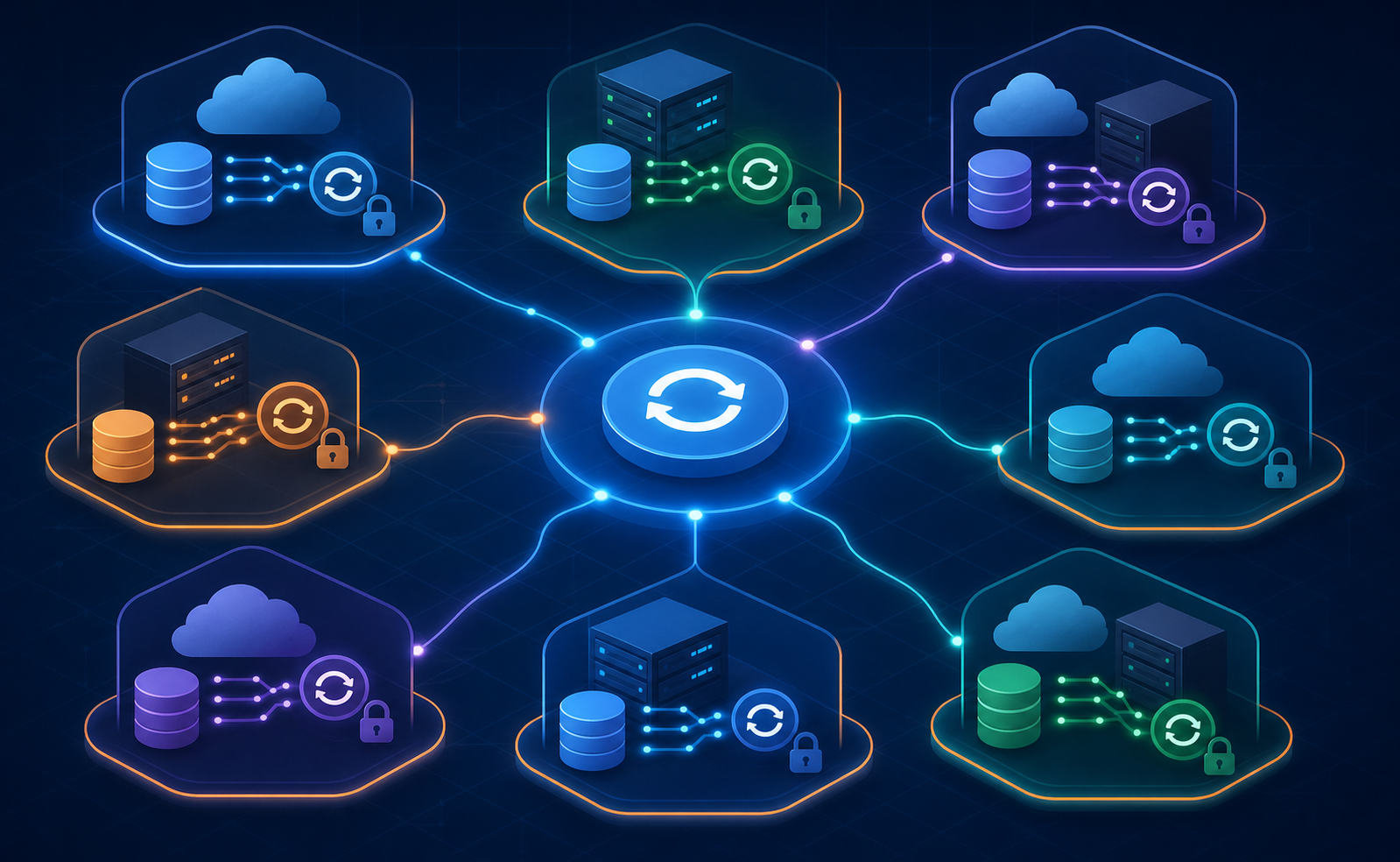
Per-tenant state management is where most teams hit the wall. Each tenant needs its own sync cursor, tracking exactly where the last successful pull ended. Share state across tenants and you get either duplicate records or silent gaps. Get the cursor logic wrong for one tenant and you can't easily tell whether the failure is their Sage environment, your connector, or a record that silently never wrote, which is exactly why per-subtenant sync health monitoring matters.
The variability compounds at scale:
- Tenant A runs Standard cloud with default modules, so your baseline connector works fine.
- Tenant B runs Professional on-premise with manufacturing and project accounting active, which adds schema complexity your defaults never anticipated.
- Tenant C runs Professional Partner Cloud with custom fields your schema mapping has never seen, requiring per-tenant field resolution at runtime.
- Tenant D has a firewall that drops idle connections after a short timeout (e.g., 30 seconds), silently breaking sync jobs with no obvious error.
Connector logic that handles tenants A and B often breaks on C or D for reasons that only surface in production. Debugging cross-tenant failures without proper per-tenant job logs means your engineers are reconstructing what happened after the fact, not fixing the root cause.
The only scalable integration architecture that holds at scale isolates tenant configuration, credentials, state, and job history completely. That isolation is table stakes for any SaaS team moving past a handful of enterprise accounts.
How hotglue Approaches Sage 200 Integration for B2B SaaS Teams
Hotglue supports Sage 200 via a cloud proxy using its native app integration tools, so your team skips the local agent architecture problem entirely. The connector handles both reads and writes, covering products, product categories, customers, sales orders, invoices, and credit notes. Bidirectional sync from day one, without building the bridge yourself.
If your customers run a mix of ERPs, managing your app integrations through a unified v2 schema across Sage 200, QuickBooks Online, and Xero keeps your downstream data model consistent regardless of which system a tenant connects. One schema, multiple accounting systems, no per-connector mapping rewrites.
The multi-tenant scale problem is handled structurally. With 38,000+ active tenants and roughly 10 billion records processed weekly, per-tenant state isolation is already built in. Tenant credentials, sync cursors, job history, and field mappings are scoped individually, so a broken sync for one customer never affects another.
Pricing runs on active tenants, not data volume. As your Sage 200 customer count grows, integration costs scale predictably with it, with no sudden spikes when a large customer runs a full historical sync.
Final Thoughts on Sage 200 Integration for Growing SaaS Teams
Building a working Sage 200 integration and building one that holds across dozens of tenants are two genuinely different engineering problems. Your deployment mix, module configurations, and on-premise Professional accounts will each find new ways to surprise you as you scale; it's almost a rite of passage at this point. The teams that hold up are the ones who designed for that variability from the start, not the ones who patched around it after the third support escalation.
Hotglue is the best solution on the market for B2B SaaS teams tackling Sage 200 integration at scale. Per-tenant isolation, bidirectional sync, a cloud proxy for on-premise Professional, and predictable tenant-based pricing make it the integration layer that grows with your product instead of against it. Book a demo and see how we approach that structure for teams already moving past their first handful of enterprise accounts.
FAQ
How do you integrate Sage 200 Professional on-premise into a B2B SaaS product?
Sage 200 Professional on-premise has no public-facing API endpoint, so direct OAuth calls won't work. You need a local agent or proxy installed inside the customer's network to bridge their Sage instance to your product. Hotglue handles this via a cloud proxy, which keeps the connector resilient to local software updates without requiring your customers to manage connection infrastructure themselves.
Sage 200 Standard vs. Sage 200 Professional: which one changes your integration architecture?
Sage 200 Professional on-premise is the harder problem. Standard is cloud-hosted and behaves like a conventional REST API integration, but Professional on-premise requires network-level access, custom credential handling per customer, and accounting for individual firewall configurations. If your UK customer base includes manufacturers or distributors, assume a meaningful share will be on-premise Professional and build your connector architecture around that case from the start.
How do I let my SaaS customers connect their own ERP without my engineering team building each connector?
An embedded iPaaS handles the connector layer on your behalf, so your customers authenticate and sync their ERP data from inside your product without your team writing per-tenant connector logic. With Hotglue, per-tenant state, credentials, sync cursors, and field mappings are all scoped individually, and the connector library covers Sage 200, QuickBooks Online, Xero, NetSuite, and others under a unified v2 schema, so your downstream data model stays consistent regardless of which ERP a customer connects.
What does Sage 200 ERP integration actually cost to maintain in-house?
The initial build rarely reflects the true cost. Sage 200 Professional compounds this because each customer instance can carry different module configurations, schema variations, and firewall setups. The cost that nobody budgets is the second engineer who spends the year keeping the connector alive while the first moves on to roadmap work.
What is the difference between a unified API and an embedded iPaaS for Sage 200 integrations?
A unified API abstracts multiple accounting systems into one schema, but your team still owns the connector infrastructure, tenant management, and sync logic. An embedded iPaaS like Hotglue sits inside your product, handles per-tenant authentication and state isolation, manages API versioning when Sage ships updates, and exposes the unified schema without your team building the pipeline layer. For teams scaling past a handful of enterprise accounts, the embedded iPaaS model removes the infrastructure overhead that a unified API alone does not solve.