Enterprise security reviews have a way of asking questions your sales team wasn't prepared for. 'Where does our financial data live during the sync?' is one of them. If your answer involves a third-party cache holding your customers' accounting records, that conversation gets complicated fast. Syncing accounting data without storing it on your servers solves that problem before it starts.
TLDR:
- Passthrough architecture syncs accounting data in memory and delivers it without writing records to any third-party database
- Cached integration layers (Merge, Apideck, Codat) add a data subprocessor to your compliance footprint, which fails enterprise vendor risk assessments
- GDPR right-to-erasure and SOC 2 audit scope both shrink when no financial records persist outside your own infrastructure
- You still need to store OAuth tokens to run scheduled syncs, but tokens are authentication artifacts, not financial records
- hotglue processes accounting data from QuickBooks, NetSuite, Xero, and others through a passthrough model with SOC 2 Type II certification
Why Storing Accounting Data Creates a Problem in the First Place
When your SaaS product pulls data from a customer's QuickBooks or NetSuite account, something has to happen to that data between the source system and your backend. The question is whether it gets written to a database somewhere along the way, or whether it moves through and disappears.
This is typically a decision that lands with the CPO or Head of Partnerships: you're the ones who feel it when a seven-figure deal stalls in procurement, and you're the ones who have to decide which integration architecture to bet on. Engineering can wire it up, but the architectural choice and its compliance consequences are yours to own.
"Storing" here means persisting records beyond the moment of transit. A cached copy sitting in your integration middleware's database, even temporarily, counts. Accounting data is about as sensitive as it gets: general ledger entries, payroll figures, vendor relationships, cash positions, and invoices that reveal exactly how a business runs financially.
That sensitivity has a direct commercial consequence. As truto.one notes, enterprise security teams will actively block deals if your integration layer caches sensitive financial records on unverified third-party infrastructure. For CPOs pushing upmarket, that's a procurement veto that surfaces late in the sales cycle, after months of work.
The Two Architectural Paths: Passthrough vs. Cached Storage
There are two ways to move accounting data through an integration layer, and the choice has consequences that reach well beyond engineering.
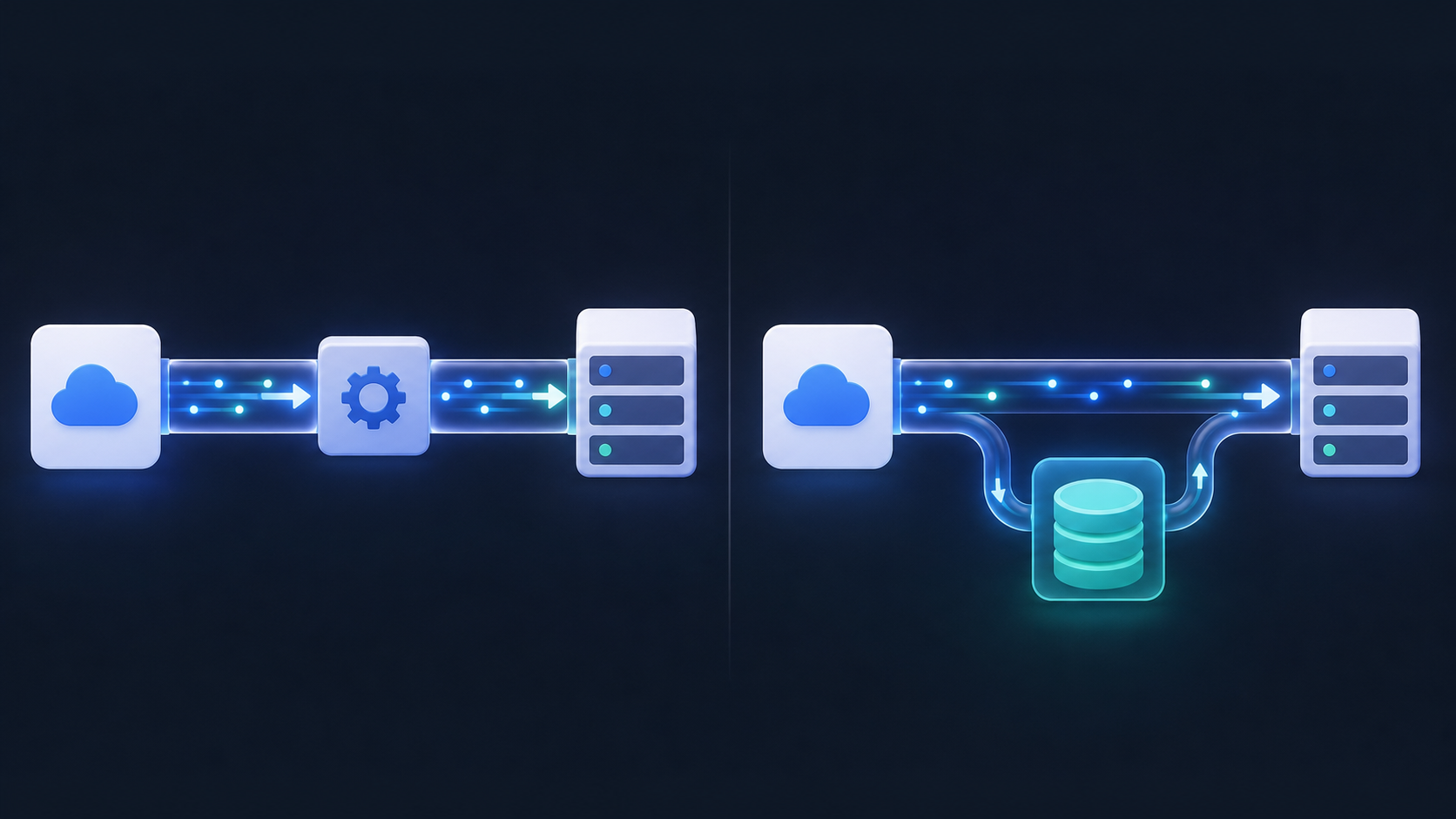
In a passthrough architecture, data is fetched from the source system, processed in memory, and delivered to your backend. Nothing gets written to a third-party database. The integration layer is stateless from a storage perspective: data moves through it, not into it.
In a cached model, the integration layer writes records to its own data store. Your app queries that store instead of hitting the source system directly. Reads become fast and consistent, and the integration can serve data even when the upstream API is slow or rate-limited.
Both choices are legitimate engineering decisions, but they carry very different compliance implications. As a Merge vs. Apideck analysis from truto.one notes, caching versus passthrough is a fundamental architectural decision with real trade-offs that surface at scale. Unified API vendors like Merge, Apideck, and Codat operate on a cached model by design. Your customers' financial records get written to a third-party data store, adding a data subprocessor to your compliance footprint. hotglue's unified accounting API processes records in flight instead, delivering them directly to your backend without persisting anything by default. For accounting data moving into compliance-heavy or enterprise environments, that distinction is exactly what keeps you out of a failed vendor risk assessment.
| Model | How it works | Compliance footprint | Best for |
|---|---|---|---|
| Passthrough | Processed in memory, delivered, discarded | Minimal | Compliance-heavy, enterprise, sensitive financial data |
| Cached | Written to integration layer's data store | Adds a subprocessor | Read-heavy, low-sensitivity, speed-first use cases |
How Passthrough Sync Works End to End
Here is what a passthrough sync looks like in practice, using the QuickBooks connector as the example.
The end customer opens the integration widget inside your product and clicks to connect their QuickBooks account. This triggers a standard OAuth 2.0 authorization flow, where Intuit authenticates the user and returns access tokens tied to their company file. Those tokens get stored as configuration alongside other connection settings. No financial records have moved yet.
When a sync runs, the integration layer uses those tokens to call the QuickBooks API, pulling invoices, journal entries, vendors, or whichever entities your flow is configured to extract. Any transformation logic runs in memory, reshaping the data to match your backend's schema. The output gets delivered directly to your system, and then the process ends. Accounting records never get written to a database outside your own infrastructure.
The token versus data distinction matters here. Access tokens are authentication artifacts, not financial information. Storing a QuickBooks access token is no different from storing a password hash: it grants access but reveals nothing about what's inside the account. General ledger entries, cash positions, vendor details, those are the records that carry compliance weight, and in a passthrough architecture they never touch persistent storage on the integration side.
The Data Configuration Lifecycle: From Connection to Offboarding
The lifecycle below covers what happens from the moment a customer connects their accounting system to the moment they leave.
- Tenant authentication and credential storage: The customer connects their accounting system through your product's UI. OAuth tokens (or API keys for systems like the QuickBooks Desktop connector) are stored as configuration data only. No financial records are captured at this step.
- Sync configuration: Your team configures which entities to pull (invoices, journal entries, vendors), sets a cron-based schedule per connector, and defines field mappings to match your backend's schema. Per-job filter overrides can be passed directly in the
POST /jobscall using hotglue's developer tools to scope exactly which data a given run fetches without touching the global connector config. - Transformation and normalization: When a sync runs, raw API responses pass through a Python transformation layer in memory. Hotglue's unified schema normalizes records from QuickBooks, NetSuite, or the Xero connector into a consistent shape before delivery.
- Delivery to your backend: Processed records are pushed directly to your system via webhook or an API connector. At that point, the integration layer's job is done.
- Post-sync cleanup: Logs capture job status, record counts, and any errors. No customer financial records persist on the integration side after delivery completes.
- Offboarding and credential revocation: When a tenant disconnects, their OAuth tokens are deleted and their sync configuration is removed. Because no accounting records were stored to begin with, offboarding is clean with no residual data to purge.
When Optional Caching Makes Sense (and How to Control It)
Passthrough by default does not mean passthrough always. There are real scenarios where holding data briefly, in a controlled way, is the right engineering call.
The cases worth considering:
- Large historical backfills where re-pulling three years of journal entries via the NetSuite connector on every failed run is expensive and likely to hit rate limits
- Incremental sync state management, where the integration needs a snapshot of what was last seen to calculate a delta on the next run
- Debugging and replay during integration failures, where having the last payload available lets your team diagnose a conversion error without asking the customer to re-trigger a sync
- Audit trail requirements in compliance-driven industries where your compliance team needs a record of exactly what was delivered and when
The key distinction is that this is an opt-in configuration, not a default. The SaaS vendor decides whether a cache bucket gets configured, where it lives, and how long records are retained before purging. That choice stays on your side of the compliance boundary, not buried in a third-party vendor's infrastructure you cannot audit.
Choosing passthrough as your default and turning on temporary caching only where it makes sense is good architecture, not a tradeoff between privacy and functionality.
GDPR Compliance: What Passthrough Architecture Changes
GDPR's data minimization principle under Article 5 says you should collect and retain only what is necessary for a specific purpose. When accounting records pass through in memory and get delivered without ever being written to a persistent store, minimization is structurally enforced, not something you audit against manually.
The subprocessor chain also gets simpler. Article 28 of the GDPR requires controllers to use only processors that provide sufficient guarantees for data protection. Each third party that touches your customers' data adds a link to that chain. A passthrough integration layer that never retains financial records does not qualify as a data processor in a meaningful sense, which means shorter DPAs and fewer procurement conversations with enterprise InfoSec teams.
Right-to-erasure requests under Article 17 become near-trivial too. When a customer asks you to delete their data, you delete it from your own systems. There is nothing to purge from the integration layer because nothing was stored there.
The stakes are real. GDPR violations can result in fines of up to €20 million or 4% of annual global turnover, whichever is higher. Choosing a passthrough architecture before you start closing enterprise deals is cheaper than retrofitting compliance after a procurement veto.
SOC 2 Compliance: How No-Storage-by-Default Shrinks Your Audit Scope
SOC 2 audit scope is determined by what your systems touch and store. Every system that processes or retains customer data has to appear in your System Description, and each one requires documented controls across the Trust Services Criteria: security, availability, confidentiality, and more.
When your integration layer caches accounting records, those records fall inside that boundary. The database holding them needs access controls, encryption at rest, logging, and incident response procedures. The vendor operating that database becomes a subprocessor you have to vet, and integration vendors that store customer data on shared infrastructure add an unmanaged subprocessor to your compliance footprint, which can stall six-figure deals in procurement.
A no-storage-by-default architecture removes that surface area. The integration layer is not in scope for data residency controls because there is no data residing in it. Fewer systems means fewer control narratives, fewer vendor assessments, and faster sign-off from enterprise InfoSec reviewers checking every third party touching financial records.
For a CPO preparing for SOC 2 Type II compliance, that matters practically: a narrower audit scope means lower audit fees, shorter prep cycles, and a cleaner story to tell prospects during security reviews. Hotglue is SOC 2 Type II certified and built on a process-and-deliver model by design.
Credential Handling: The One Thing You Do Need to Store
Passthrough architecture does not mean storing nothing. It means storing only what is necessary to maintain the connection, which comes down to OAuth tokens and connection credentials.
When a customer connects their QuickBooks Online or Xero account, the authorization flow issues an access token and a refresh token. Those tokens need to persist somewhere so the integration can run scheduled syncs without asking the customer to re-authenticate every time. That storage is unavoidable and appropriate. It is also categorically different from storing financial records: a token grants access to an account but contains no general ledger entries, no vendor data, no cash positions.
The obligations that come with token storage are narrower but still real:
- Tokens must be encrypted at rest, not stored as plaintext configuration values
- Refresh tokens should be rotated on each use and replaced when access tokens expire
- When a tenant disconnects, tokens must be revoked immediately through the provider's API and deleted from storage
- Scope should be limited where the API allows it, though note that the QuickBooks Online Accounting API grants both read and write access with no read-only option available
Xero and QuickBooks Online both issue OAuth 2.0 tokens with defined expiry windows. Hotglue handles token refresh automatically, so your engineering team never needs to manage rotation logic or expiry edge cases directly.
What Enterprise Buyers Actually Ask During Security Reviews
These questions arrive late in the deal cycle, usually from someone in InfoSec you have never spoken to before, and they can stall a six-figure contract while your champion scrambles for answers. (Nothing like a lengthy vendor questionnaire landing late on a Friday to really test your Zen.)
Here is what actually gets asked, and what a passthrough architecture lets you say:

- "Does your integration partner store our general ledger data?" No. Records move through in memory and get delivered to your backend. Nothing is written to a third-party database.
- "Who are your subprocessors for financial data?" The integration layer is not a subprocessor for accounting records because it never retains them. Your subprocessor list stays short.
- "Can you provide a DPA?" Yes, and it is a short one. When no financial records are stored, the data processing obligations are limited to credential handling, not record retention.
- "What happens to our data if we disconnect?" OAuth tokens are revoked and deleted. Because no accounting records were stored to begin with, there is nothing to purge.
- "Are you SOC 2 certified?" Hotglue is SOC 2 Type II certified. The no-storage-by-default architecture keeps financial records outside the audit boundary entirely.
Clean architecture means clean answers, and clean answers close deals.
hotglue's Passthrough Architecture for Accounting Integrations
hotglue was built around the passthrough model described throughout this article. Accounting records from QuickBooks Online, Xero, NetSuite, the Sage Intacct connector, Sage 300 CRE, Microsoft Dynamics 365, and Acumatica move through a Python transformation layer in memory, get delivered to your backend, and disappear, whether through the Sage 300 CRE connector or any other source. Nothing gets written to a hotglue database by default.
That default holds at real scale. hotglue processes approximately 10 billion records weekly across 38,000+ active tenants running on AWS ECS via Fargate. SOC 2 Type II certification and GDPR compliance are built into the product, not bolted on afterward.
If your team has a legitimate reason to cache output, S3 is a configuration option you control, with retention windows you define. It stays on your side of the compliance boundary.
For teams heading into an enterprise security review, the practical upshot is straightforward: hotglue never appears as a data-storing subprocessor on a vendor risk assessment for accounting records. The integration layer processes and delivers, then gets out of the way.
Final Thoughts on Syncing Accounting Data Securely Across Your Integration Layer
The passthrough model keeps financial records where they belong: in your systems, not spread across third-party infrastructure you cannot audit. That cleaner data flow pays off during security reviews, GDPR assessments, and any procurement conversation where someone asks who your subprocessors are. If this sounds like the right fit for where your product is heading, grab some time with our team to talk through the specifics.
FAQ
How do I let my SaaS customers sync their accounting data without storing it on my servers?
Use a passthrough architecture: the integration layer fetches data from QuickBooks Online, Xero, or NetSuite using OAuth tokens, processes it in memory, and delivers it directly to your backend without writing records to any third-party database. Hotglue is built on this model by default, so accounting records from QuickBooks, NetSuite, Sage Intacct, and others move through a Python transformation layer, get delivered to your system, and disappear. The only thing stored on the integration side is the OAuth token used to maintain the connection, which is categorically different from storing financial records.
What is passthrough architecture vs. cached storage for accounting integrations?
Passthrough means accounting records are processed in memory and delivered directly to your backend: nothing gets written to the integration layer's database. Cached storage means the integration vendor writes your customers' financial records to their own data store, adding a subprocessor to your compliance footprint that enterprise InfoSec teams will flag during vendor risk assessments. For compliance-heavy or upmarket deals, the cached model tends to fail procurement reviews; passthrough keeps your subprocessor list short and your DPA simple.
How does a passthrough integration keep SOC 2 audit scope manageable?
With a passthrough model, the integration layer never retains accounting records, so it stays outside your audit boundary entirely: fewer systems to document, lower audit fees, and a cleaner story to tell enterprise prospects during security reviews. (For a full breakdown of how audit scope is scoped, see the SOC 2 section above.) Hotglue is SOC 2 Type II certified and built on a process-and-deliver model by default.
Can I still cache accounting data temporarily if my use case requires it, without breaking data privacy for my SaaS product?
Yes, passthrough as a default does not mean passthrough in every situation. For large historical backfills, incremental sync state management, or audit trail requirements, you can configure an S3 bucket with a defined retention window as an opt-in choice your team controls. The key is that this configuration stays on your side of the compliance boundary, not buried in a third-party vendor's shared infrastructure you cannot audit or verify.
What do enterprise security teams actually ask about accounting integration data privacy during procurement reviews?
The questions that arrive from InfoSec late in a deal cycle typically cover whether your integration partner stores general ledger data, who your subprocessors are for financial records, what happens to customer data on disconnect, and whether you hold a SOC 2 certification. A passthrough architecture gives you a clean answer to each: no financial records are stored, the integration layer does not qualify as a data subprocessor for accounting records, OAuth tokens are revoked and deleted on disconnect, and Hotglue is SOC 2 Type II certified with financial records kept outside the audit boundary entirely.