Integrations come up in 60% of sales deals, and your customers are checking your integration roadmap before they sign. The problem is that every connector your team builds turns into a maintenance commitment they didn't fully sign up for. An embedded iPaaS flips that equation in a way that your engineers will actually appreciate.
TLDR:
- Building integrations in-house costs $20,000-$40,000 each, and that's before maintenance compounds
- Integrations come up in 60% of sales deals, so your roadmap directly affects deal velocity and revenue
- Each integration a customer activates raises switching costs and drives lower churn and stronger renewals
- In-house builds break down at scale: the third request, the fourth variation, the first deprecated endpoint
- Hotglue offers 650+ open-source connectors with a white-label UI and per-tenant pricing for B2B SaaS teams
What Is Embedded iPaaS (and How Is It Different from Traditional iPaaS)?
An embedded iPaaS is an integration layer built directly into your product so your customers can connect their tools without ever leaving your app. Think QuickBooks, Salesforce, Shopify, Paylocity. Your customers want their data flowing between your product and the software they already use. An embedded iPaaS handles the authentication, data syncing, and connector maintenance so your team doesn't have to.
Traditional iPaaS tools like Workato or MuleSoft were designed for internal IT teams connecting internal systems. An embedded iPaaS points outward, toward your end users, and lives inside your product as a native experience.
The practical difference matters. With a traditional iPaaS, your customers would need to leave your product, log into a separate integration hub, and configure things themselves. With an embedded iPaaS, the integration catalog lives inside your UI, branded as your own, and your customers configure connections without knowing there's a third-party layer underneath.
Why Integration Demand Is Outpacing What Engineering Teams Can Build
84% of businesses say integrations are "very important" or a "key requirement" for their customers, and integrations factor into 60% of sales deals. Your customers are making buying decisions based on your integration roadmap right now.
The problem is that engineering capacity doesn't scale with customer requests. Every new integration ask means API research, authentication logic, error handling, and ongoing maintenance. One customer wants Salesforce. Another needs NetSuite. A third asks about Paylocity. Each one is scoped as a few weeks of work, but the queue grows faster than it shrinks.
The Real Cost of Building Integrations In-House
The initial estimate looks manageable. One engineer, a few weeks, one API. But that estimate almost never accounts for what comes after, and building user-facing SaaS integrations yourself carries costs most teams don't see until they're already deep in maintenance.
Leen's breakdown of in-house integration costs puts the visible build cost at roughly $20,000 to $40,000 per integration in engineering time alone. That's before any API endpoint changes, before a customer's Shopify instance breaks your connector, before you're rebuilding auth logic because a vendor deprecated their OAuth flow.
The hidden costs are where the real damage happens:
- API versioning and endpoint deprecations that force full connector rebuilds
- Schema drift when third-party data models shift between releases
- Rate limiting logic that has to be re-engineered per provider
- Authentication updates across OAuth, API keys, and PKCE flows
- Customer-specific variations that turn one connector into several
Engineers underestimate this burden not because they're careless, but because the maintenance surface only becomes visible after the connector is live.
How Embedded iPaaS Works: Core Architecture and Capabilities
An embedded iPaaS sits beneath your product as a multi-tenant integration layer. Each of your customers gets their own isolated environment, handling their own credentials and syncs, while you manage everything from a single control plane.
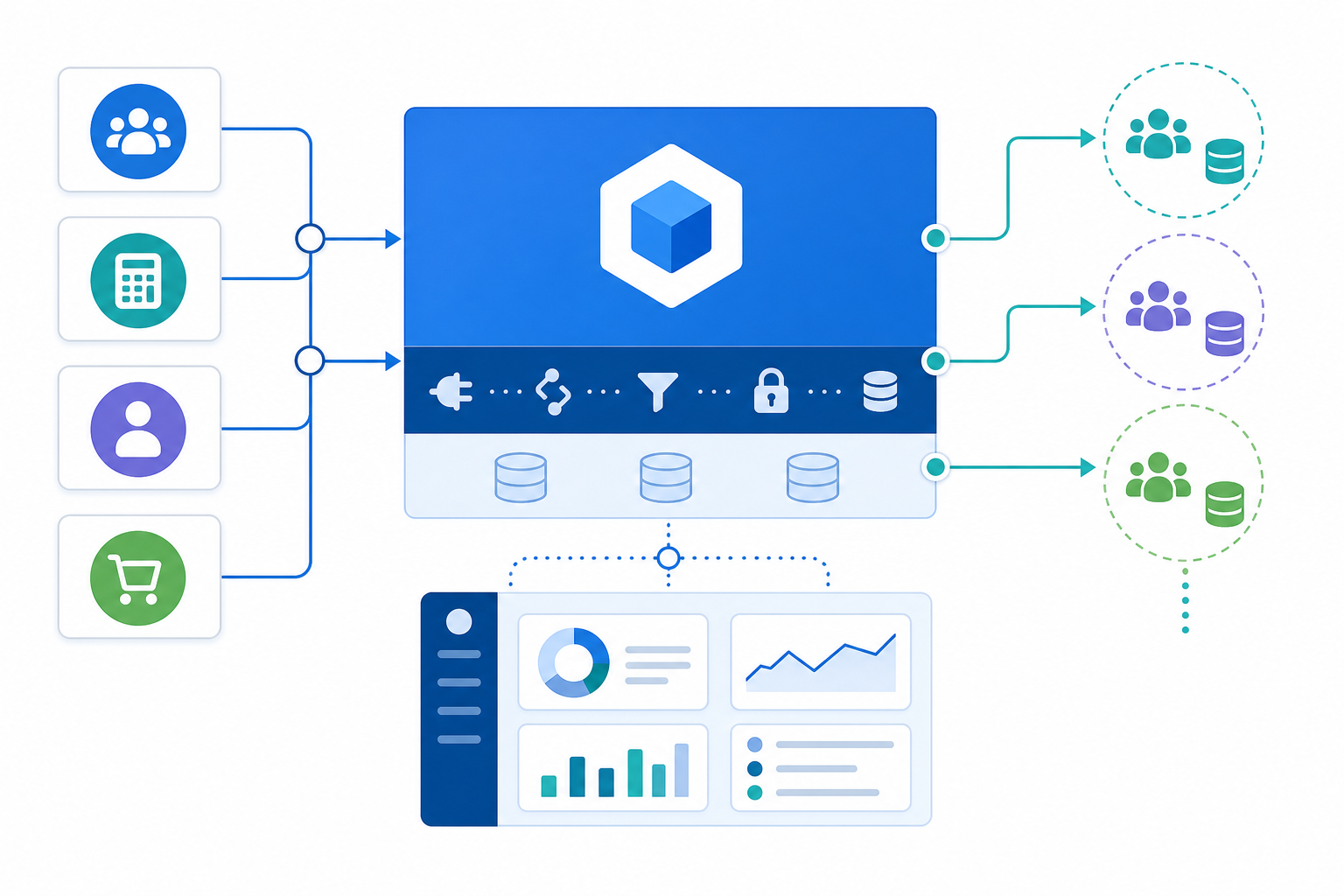
Core capabilities to expect:
- Prebuilt connectors with authentication, API calls, pagination, and rate limiting already handled
- A transformation layer for mapping third-party data models to your own schema
- Flexible sync scheduling, configurable per connector and per tenant
- Webhook callbacks after syncs complete, so your app can react to new data
- Error handling and retry logic that frees your engineers from babysitting jobs
- A white-label UI layer your customers interact with inside your product
The white-label piece matters more than it sounds. Your customers never see a third-party tool. They see your integration catalog, your branding, your configuration flows. The embedded iPaaS is invisible infrastructure.
Transformation logic is where many teams find the real value. Raw API data rarely maps cleanly to your data model. A good embedded iPaaS gives you a place to normalize, deduplicate, and reshape that data before it touches your system, without custom glue code living in your codebase.
Embedded iPaaS vs. Unified API: Choosing the Right Architecture
Both categories solve integration problems, but they make very different bets on what matters.
A unified API normalizes data from multiple systems into one schema: one endpoint, many sources. The appeal is speed: connect once and get a standardized data model across CRMs or HRIS tools without writing per-connector logic. The trade-off is that you're working within the boundaries of someone else's data model. If Salesforce has a field that doesn't map cleanly to the unified schema, you lose it, which is why unified APIs don't work for CRM integrations at any real depth.
An embedded iPaaS keeps you at the connector level, giving you full access to the raw data model from each system. That means you can handle edge cases, custom fields, and customer-specific variations that a unified API schema would silently flatten or drop.
| Unified API | Embedded iPaaS | |
|---|---|---|
| Data model | Normalized, schema-defined | Native per connector |
| Custom fields | Often unsupported | Supported |
| Connector control | Vendor-managed | Configurable |
| Best for | Broad, shallow reads | Deep, production-grade sync |
If you're reading data from many similar systems and don't need custom field support, a unified API is a reasonable fit. If your customers need bidirectional sync, complex transformations, or access to fields that don't survive normalization, an embedded iPaaS is the right call.
When Building In-House Still Makes Sense
Building in-house isn't always the wrong call.
If you have one or two integrations connecting to stable APIs with clean documentation and no ongoing versioning risk, the overhead of adopting an external tool may not be worth it. A small, well-scoped integration your team owns cleanly can stay owned cleanly.
The same logic applies when the integration is deeply proprietary. If you're connecting to an internal system with no public API spec, or a partner-specific data model no external connector library would ever cover, you may have no choice but to build it yourself.
Where in-house consistently breaks down is at scale. The third integration request, the fourth customer variation, the first time a vendor deprecates an endpoint you built against: that's when the maintenance burden compounds faster than your team can absorb it.
Scalable Integration Architecture Patterns for B2B SaaS Products
Each of your customers needs isolated credentials, sync state, and error logs. Without tenant-level isolation, a single bad sync can pollute data across your entire customer base, and debugging becomes a serious time sink.
A few architectural patterns that hold up as you scale:
- Keep transformation logic separate from connector logic. Connectors handle auth and data extraction; transformation happens in a dedicated layer where you control field mapping and normalization per customer, a pattern central to building a data integration pipeline without tech debt.
- Separate dev and production environments. Changes to ETL scripts should never touch live customer syncs. This sounds obvious until someone deploys a half-finished mapping to production at 9am on a Monday.
- Design connectors for reuse. A Salesforce connector built for one customer should be the same foundation for the next, with only the field mapping layer customized per account.
- Build retry and state management in from the start. Partial sync failures that silently succeed are far harder to debug than outright failures.
The reusability point is where teams most often underestimate complexity. A connector that works for one customer's Shopify setup may break entirely when another customer has Loop Subscriptions layered on top. The connector foundation stays the same; the transformation layer absorbs the variation.
How Integrations Drive Retention and Revenue Expansion
Once a customer connects QuickBooks, Salesforce, or Paylocity to your product, switching costs rise sharply. They're no longer looking at your features in isolation. They're weighing the cost of rebuilding those data flows somewhere else.
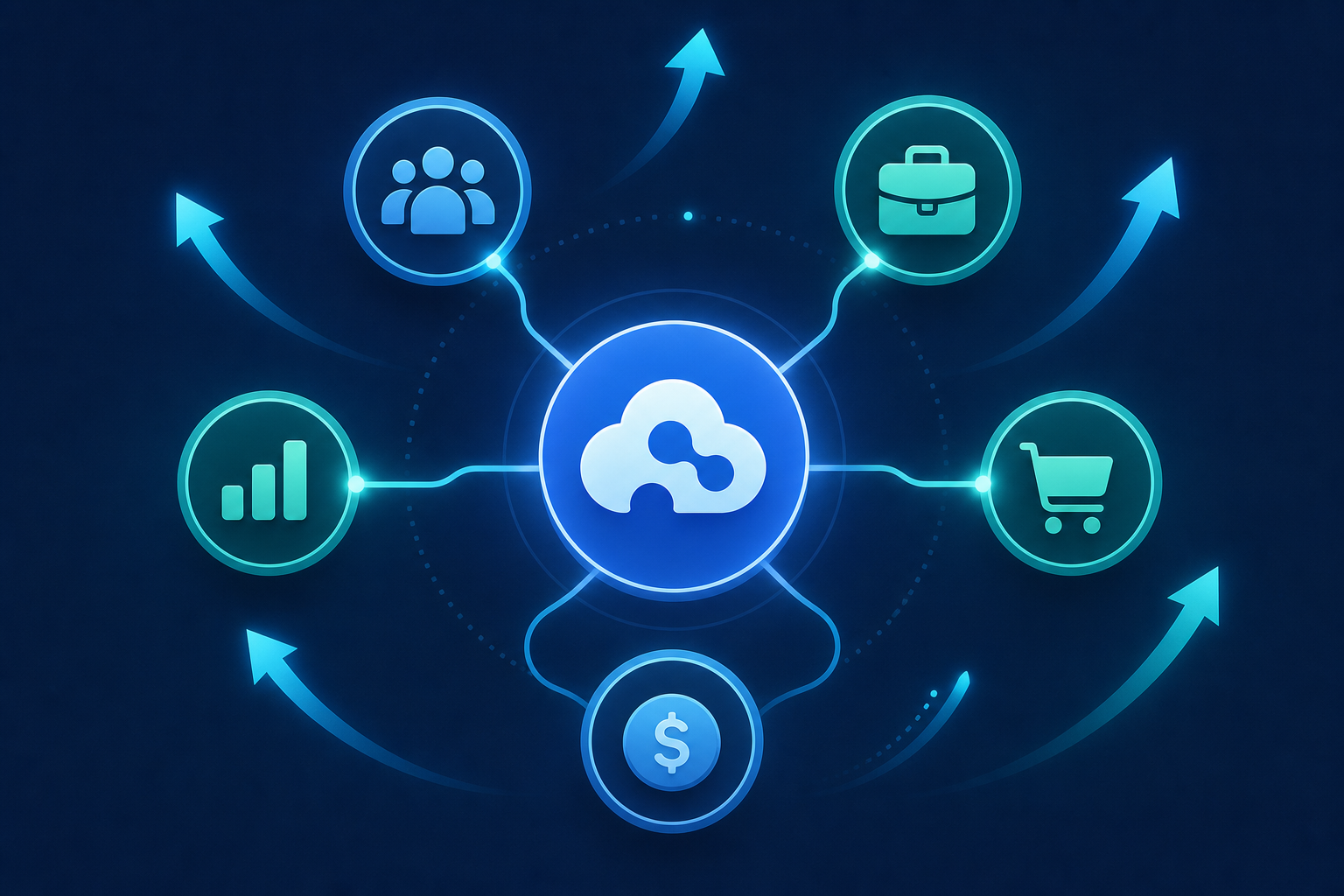
That stickiness compounds. Each integration a customer activates creates another dependency on your product, which means lower churn probability, longer contracts, and stronger renewal conversations.
There's an expansion angle too. Customers who connect one integration tend to connect more, and each connection creates a natural conversation around upgraded tiers or expanded usage.
For a CPO or Head of Partnerships, this reframes the integration roadmap entirely. Integrations are a retention and expansion driver you're investing in deliberately, with outcomes a CFO can model: lower churn, higher NRR, faster expansion revenue from existing accounts.
How to Build the Business Case for an Embedded iPaaS
The real challenge is convincing an engineering lead who already feels ownership over integrations that bringing in an external tool isn't a vote of no confidence. The stigma of embedded iPaaS is real, and worth tackling head-on.
The quantitative case is straightforward. If each integration costs 3-6 weeks of engineering time to build and maintain, and you're fielding 4-6 requests per year, that's a meaningful portion of your roadmap consumed by infrastructure work that doesn't ship product. Recapturing that time is the core ROI argument.
Structure the pitch around three numbers:
- Engineering hours recovered per integration, counting both initial build time and ongoing maintenance burden
- Deal velocity improvement when integration requests stop blocking sales cycles
- Churn reduction from customers who activate integrations vs. those who don't
The qualitative argument matters most for engineering leads. An embedded iPaaS gives engineers more control over the transformation layer, not less. Open-source connectors mean no black-box dependencies. Separated dev and production environments mean no one's testing against live customer data.
For founders skeptical on cost, the math is simple: a $25-50k annual contract that recovers 3-4 months of senior engineering time pays for itself before Q2.
What to Look for in an Embedded iPaaS Vendor
The table below covers the key criteria to weigh when reviewing vendors. Pay close attention to the questions under each row. The answers separate vendors that work in practice from those that only look good in a demo.
| Criteria | What to review |
|---|---|
| Connector depth | Does the vendor support the specific systems your customers use, including edge cases like QuickBooks Desktop or Sage 300 CRE? Breadth of a catalog means little if the connectors you need are missing or shallow. |
| Pricing model | Per-tenant pricing scales predictably with your customer base. Per-data-volume pricing creates unpredictable bills as sync frequency increases. Know which model you're buying before you sign, since pricing structure is one of the key factors in choosing the best embedded iPaaS solution. |
| On-premise support | Most embedded iPaaS vendors skip on-prem entirely. If your customers run legacy accounting or ERP systems, confirm support before assuming it exists. |
| White-label UI | Can your customers configure integrations inside your product, under your brand, without seeing a third-party tool? If the answer is no, that's a gap in the end-user experience. |
| Open-source connectors | Black-box connectors create hidden dependencies. Open-source connectors let your engineering team inspect, fork, and understand exactly what's running against your customers' data. |
| API maintenance | Third-party APIs change constantly. Ask who handles endpoint deprecations, auth updates, and schema drift, and how quickly. |
| Security posture | SOC 2 Type II and GDPR compliance are table stakes. Also ask whether the vendor stores customer data at rest or processes and delivers it directly. |
| Developer experience | How fast can you stand up a new connector? What does the transformation layer look like? Is there a sandbox available before you commit commercially? |
One question worth asking every vendor directly: how long does it take to go from API access to a live connector? The answer tells you a lot about how the team actually operates versus how they present in a sales call.
How Hotglue Approaches Embedded Integration for B2B SaaS Teams
Hotglue was built as an embedded ETL layer for exactly this scenario: product teams fielding more integration requests than their engineering org can absorb, with connectors that break quietly and maintenance that compounds over time.
A few specifics worth knowing:
- 650+ open-source connectors, including deep support for accounting and ERP systems most vendors skip, such as QuickBooks Desktop, Sage 300 CRE, NetSuite, and Dynamics 365
- Flexible cron-based sync scheduling configurable per connector, so Salesforce syncs hourly while QuickBooks runs nightly in the same deployment
- A Python-powered transformation layer where your team controls field mapping, normalization, and deduplication logic, with separated dev and production environments so nothing experimental touches live customer data
- White-label deployment so your customers configure integrations inside your product, under your brand, with no visible third-party layer
- SOC 2 Type II and GDPR compliant by design, with no customer data stored at rest
Hotglue currently works with 70+ B2B SaaS companies, supporting 38,000+ active tenants and processing roughly 10 billion records weekly. For a broader look at the embedded iPaaS integration platforms in the market, it's worth understanding what sets each one apart. Pricing scales with your customer base, not data volume or sync frequency.
On connector turnaround: once we have sandbox API access, we can ship a new connector in one to two weeks. Every connector is open-source, so your team can inspect exactly what runs against your customers' data.
Final Thoughts on Building a Scalable Integration Strategy for B2B SaaS
For most B2B SaaS teams, the integration backlog grows faster than the engineering team can work through it, and that gap tends to widen over time. Whether you go with an embedded iPaaS or keep building in-house, the goal is the same: give your customers the connections they need without your engineers living in API docs. If you want to dig into the specifics, we're happy to walk through it.
FAQ
Embedded iPaaS vs building integrations in-house: what should a B2B SaaS product team choose?
An embedded iPaaS is the better call for most product teams once integration requests reach 3 or more, because the real cost of in-house builds compounds fast: API endpoint deprecations, OAuth flow changes, schema drift, and customer-specific variations each add maintenance burden your engineers didn't price into the original estimate. Building in-house still makes sense for one or two deeply proprietary integrations against stable, well-documented APIs with no versioning risk, but at scale, the maintenance surface grows faster than any team can absorb it.
How does an embedded iPaaS work differently from a traditional integration platform like Workato or MuleSoft?
A traditional iPaaS connects internal systems for IT teams and lives outside your product. An embedded iPaaS sits inside your product as a multi-tenant layer: your customers connect their tools (QuickBooks, Salesforce, Paylocity) without leaving your app, the vendor handles authentication and sync orchestration, and your branding is all they see. The end user never knows a third-party layer exists.
How do I build the business case for an embedded iPaaS when my engineering team already handles integrations in-house?
Anchor the argument to three numbers: engineering hours recovered per integration (build time plus ongoing maintenance), deal velocity gained when integration requests stop blocking sales cycles, and churn reduction from customers who activate integrations versus those who don't. A $25-50k annual contract that frees 3-4 months of senior engineering time from maintenance work pays for itself before Q2. On top of that, open-source connectors with separated dev and production environments give engineers more control over the transformation layer, not less.
What's the fastest way to add customer-facing CRM and ERP integrations to a B2B SaaS product without building from scratch?
An embedded iPaaS with a deep prebuilt connector library is the fastest path. Hotglue, for example, can ship a new connector in one to two weeks from sandbox API access, with connectors for Salesforce, HubSpot, NetSuite, QuickBooks, and 650+ other systems already available out of the box. The connectors are open-source, so your engineering team can inspect what runs against customer data instead of trusting a black box.
When does a unified API make more sense than an embedded iPaaS for SaaS integrations?
A unified API fits when you need broad, shallow reads across many similar systems (like multiple CRMs) and don't require custom field support or bidirectional sync. If your customers need access to non-standard fields, complex transformations, or production-grade sync with deduplication logic, a unified API will silently flatten or drop the data that matters most, and an embedded iPaaS is the right architecture instead.