If a customer has ever asked your product to sync with QuickBooks, you know the ask sounds simple and the build does not stay that way. Duplicate payments, silent token failures, and report endpoints that don't behave like regular API resources are the parts nobody warns you about. Here's what to watch for before you're debugging it in a live tenant.
TLDR:
- QBO and QBD are completely different integration architectures; scoping for one leaves real customers unserved.
- OAuth refresh tokens expire after 100 days of inactivity, causing silent sync failures across your tenant base.
- QBO supports a request ID for idempotent writes, but your integration layer has to generate, store, and reuse it, or a retried create becomes a duplicate payment.
- QuickBooks reports live in a separate API and return display-formatted output, not structured records you can paginate.
- Hotglue normalizes QBO and QBD into a unified v2 schema, including Profit & Loss Detail reports, across both variants.
What QuickBooks Integration Actually Involves for a B2B SaaS Product
When a customer asks your product to "sync with QuickBooks," they mean their accounting data (invoices, payments, vendors, journal entries) flowing reliably into your product, across their specific QuickBooks setup, without corrupting their books.
That's a different problem than connecting your own internal tools. As the CPO or Head of Partnerships shepherding this project, you own the scoping decisions: which QuickBooks variants to support, which entities to sync, and how to handle failures across your tenant base. Your engineering team owns the build, but the architectural choices that determine whether this integration is reliable or a constant support burden start with you. That's the core challenge when you integrate QuickBooks with your SaaS platform. (Your engineering team will thank you for reading this before the sprint planning meeting.)
QuickBooks is deeply entrenched across small and mid-sized businesses, and its largest footprint sits in industries like construction and accounting. Odds are your customers are already in it.
QuickBooks Online vs QuickBooks Desktop: Two Entirely Different Integration Problems
QBO and QBD share a brand name and not much else. Think of them as siblings who went to the same school but ended up with completely different careers — one became a cloud-native API and the other still insists on living in a Windows machine on-prem. QBO is a cloud REST API secured with OAuth 2.0: you authenticate per tenant, manage token refresh cycles, and hit endpoints over HTTPS like any standard API. QBD is a Windows-resident application with no cloud API. Data flows through the QuickBooks Web Connector, a Windows service that runs on the customer's machine and exchanges XML over a local SOAP interface.
These are two separate integration architectures. Treating them as one will break your build plan fast.
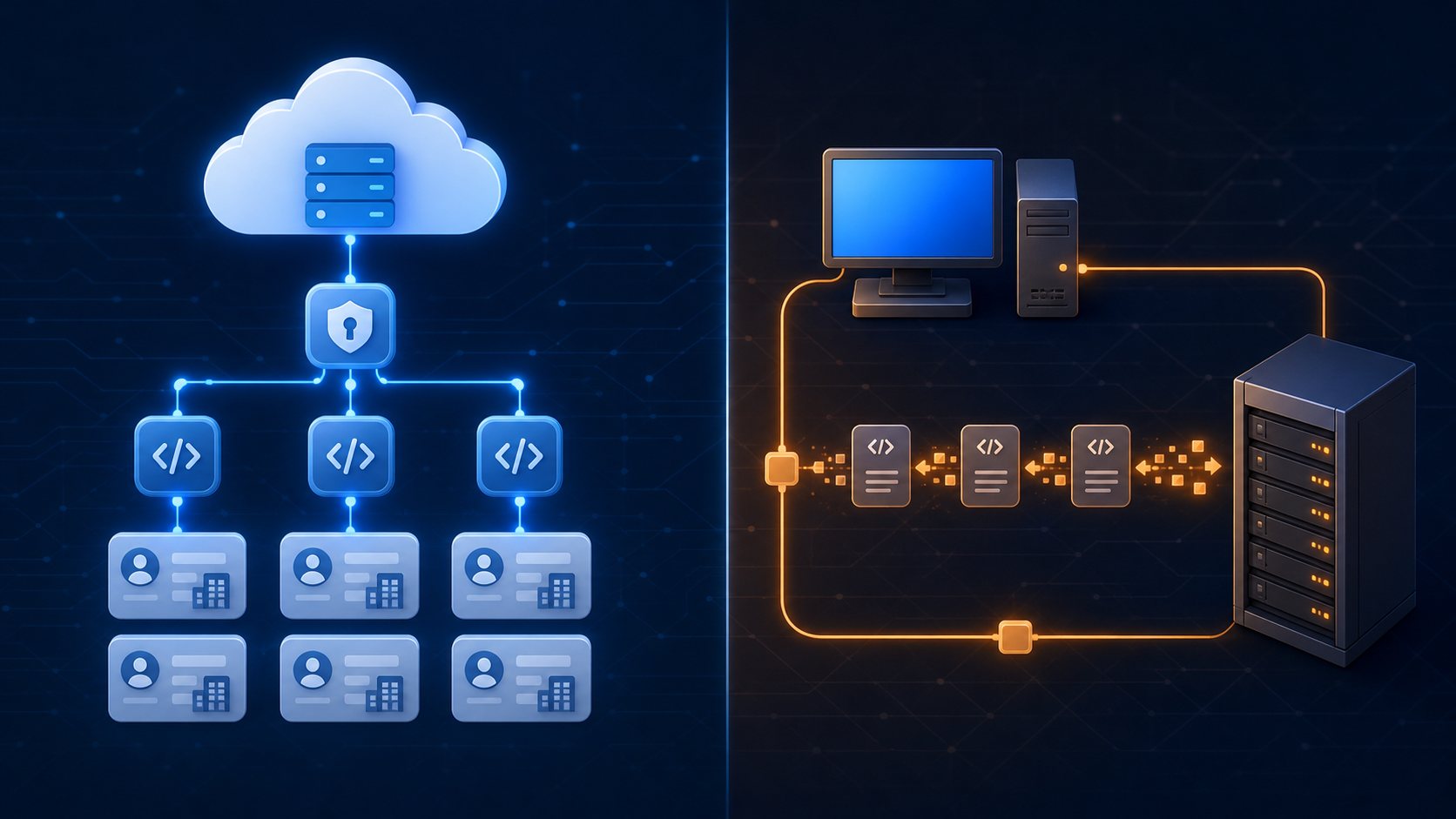
| Dimension | QuickBooks Online | QuickBooks Desktop |
|---|---|---|
| API type | REST (JSON) | QBWC / SOAP (XML) |
| Auth | OAuth 2.0, per tenant | Windows agent, per machine |
| Connectivity | Cloud | On-premise only |
| Token lifecycle | Refresh tokens expire; requires active management | No tokens; session-based per sync |
| Multi-tenant support | Native | Requires agent install per customer machine |
If your customers include mid-market or construction companies, many of them are still on QBD. Scoping your integration for QBO only means leaving a meaningful portion of your addressable market unserved from day one, a scoping mistake covered in our ERP integration guide for product teams.
The QuickBooks Online API: OAuth Lifecycle, Rate Limits, and Minor Versions
QBO's REST API is well-documented. The real complexity shows up in production, not in the docs.
Three things catch teams off guard at scale:
- OAuth refresh tokens expire after 100 days of inactivity. In a multi-tenant deployment, any tenant who hasn't triggered a sync in a while will silently lose their connection. You need per-tenant token tracking and proactive refresh logic, or syncs will start failing without obvious errors.
- QBO enforces per-realm and per-app rate limits. Hit them across many tenants simultaneously and you'll see throttled responses that look like data gaps if your retry logic isn't solid.
- The
minorversionparameter controls which fields appear in API responses. Intuit's best practices documentation covers versioning in more depth. The short version: omit it and certain fields simply won't appear in the response, with no error, just missing data.
None of these fail loudly. They degrade silently, which makes them particularly painful in a customer-facing context where your end user notices before you do. It's one of several hidden costs of ERP integrations teams underestimate.
Preventing Duplicate Payments and Records in a QuickBooks Integration
Duplicate payments are one of the most damaging things a QuickBooks integration can produce. A failed API call retried without proper state tracking will create a second record, and your customer's accountant will find it.
QBO's SyncToken update mechanism is your first line of defense on updates. Every entity carries a token that increments on each write. Send a stale token and the API rejects the update. This prevents conflicting writes, but does nothing for duplicate creates.
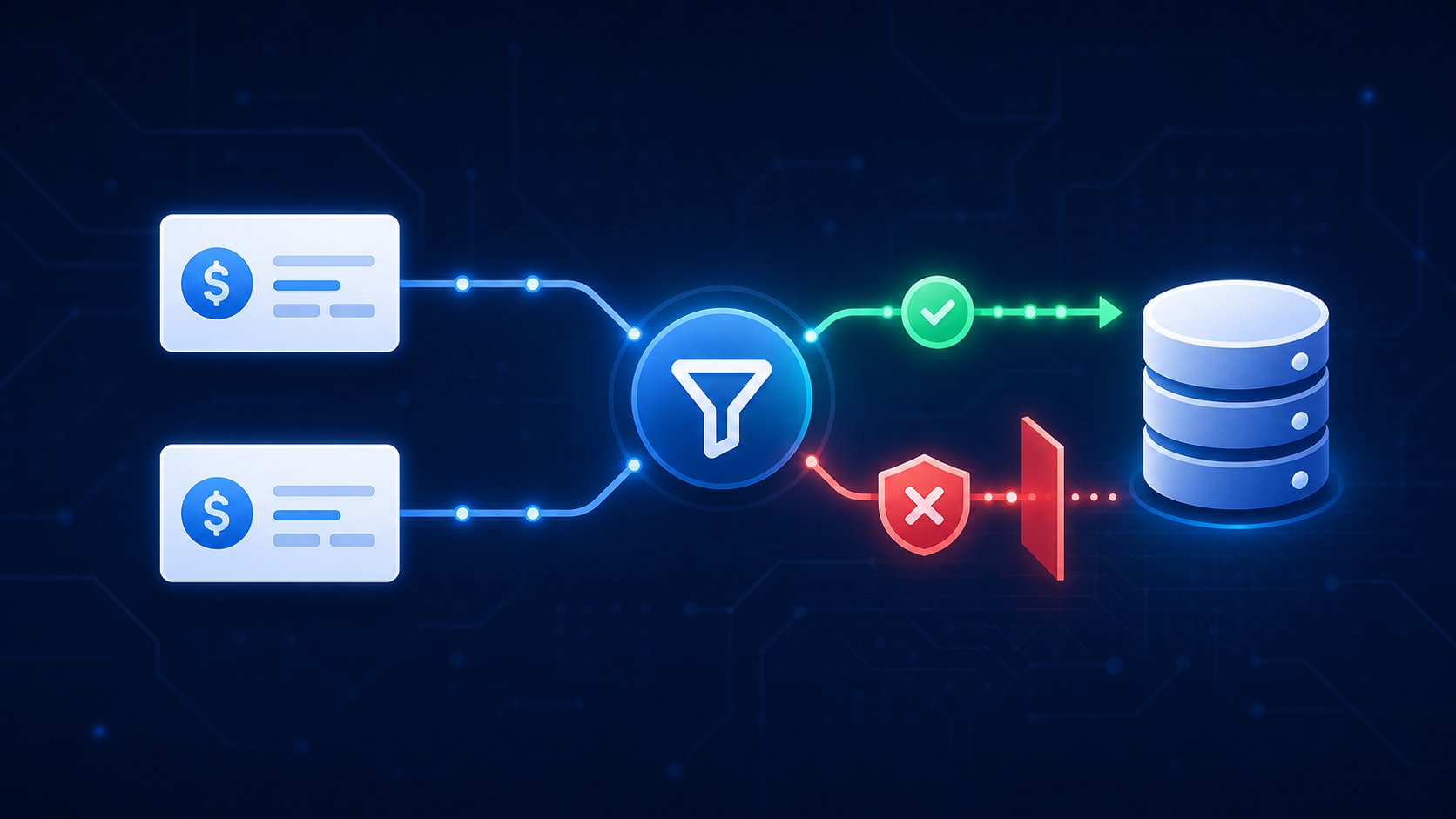
For creates, you need idempotency on your side. QBO accepts a requestid parameter, and Intuit's best practices documentation notes that without a unique request ID, a retried transaction creates a duplicate with a new ID. Generating, persisting, and reusing that ID across retries falls on your integration layer, along with tracking which records were already written before you retry a failed job.
Use Change Data Capture instead of full entity re-syncs. CDC returns only what changed since your last sync timestamp, which shrinks the write surface on every run and cuts the blast radius when something fails mid-job.
Scoping Tables and Entity Coverage in Your QuickBooks Data Model
Most teams start by syncing everything QuickBooks exposes, then spend weeks debugging schema mismatches that had nothing to do with their actual product requirements.
Scope your entities against what your product consumes downstream. A spend management tool needs Bills, Vendors, and Payments. An invoicing product needs Customers, Invoices, and Invoice Payments, and those scoping decisions look different again when you review our construction SaaS Sage and QuickBooks integration guide. Pulling Journal Entries, Classes, and Departments on top of that adds schema complexity with no product benefit.
Here are the core QBO entities worth knowing upfront:
- Customers, Vendors, Employees: reference data that should be synced first, as most transactional records point back to these
- Invoices, Bills: the primary transactional documents your pipeline will revolve around
- Payments, Bill Payments: settlement records that must be linked correctly to avoid double-counting
- Accounts (Chart of Accounts): required context for any general ledger mapping
- Journal Entries: only worth pulling for direct ledger integrations
- Items: the product and service catalog, needed when you care about line-item detail
One entity category sits entirely outside the standard REST model: reports. Profit & Loss, Balance Sheet, and similar outputs come from a separate reporting API endpoint. You cannot paginate them, filter them by ID, or treat them like other entities, which trips up a lot of builds.
Hotglue's QuickBooks connector handles this by exposing reports as distinct streams alongside standard entity streams, so your ETL pipeline treats them consistently without separate fetch logic for each report type. The QuickBooks Desktop Web Connector also supports Profit & Loss Detail reports in the same unified v2 format available from QBO, keeping your downstream schema consistent regardless of which QuickBooks variant your customer runs.
Why QuickBooks Reports Are Not Regular API Resources
QuickBooks reports sit in a completely separate reporting API from standard entity endpoints. Profit & Loss, Balance Sheet, and Trial Balance return pre-formatted, flat output, not the structured JSON records you can paginate or filter by ID.
The response schema looks nothing like a Bills or Invoices response. Column headers arrive as display strings, rows nest inside Rows.Row arrays, and field names vary by report type. A "Net Income" label in one report may appear under a different key in another, giving teams raw presentation data formatted for human reading, not for downstream processing.
Parameters also differ from standard query filters. You specify date ranges, accounting method (cash vs accrual), and summarization options. Miss the accounting_method param and you'll silently pull accrual figures for a cash-basis company with no error to flag it.
Parsing display-formatted output into structured records your pipeline can actually use is non-trivial normalization work, not unlike the steps required when you import CSV data into QuickBooks using Python.
Normalizing Data Across QuickBooks Online and QuickBooks Desktop
QBO and QBD expose the same accounting concepts through completely different object models. Field names, nesting structures, and optional feature support diverge enough that a schema built for one will break silently against the other.
A few specific gaps to plan for:
- Class tracking is an optional feature in both versions. A customer who never turned it on will return nothing in those fields. Your schema needs to tolerate null class references without rejecting the parent record.
- Multi-currency support differs between versions and depends on how each company file is configured. Currency fields you see on QBO invoices may be missing from QBD payloads.
- Account types use overlapping but not identical naming conventions across versions. Map against account type codes, not display strings.
The practical approach is to define your canonical schema against the superset of both models, then treat missing fields as nullable, not required. Downstream systems should expect gaps and handle them gracefully, not assume completeness because a field exists in one version.
Hotglue's unified v2 schema is built for exactly this. QBO and QBD data lands in a consistent output format, so your pipeline doesn't need separate logic per variant. Profit & Loss Detail reports are a good example: they arrive in the same v2 format from both.
Setting Up a Multi-Tenant QuickBooks Integration: Architecture Considerations
Per-tenant isolation is the core architectural requirement. Each customer connects their own QuickBooks company file, which means a separate realm ID, separate OAuth tokens, and separate sync state. Store these at the tenant level, never shared across accounts.
The failure surface multiplies with each tenant you add. A token that expired for one customer should not stall the sync queue for others. Job execution needs isolation so a throttled realm or failed transformation affects only that tenant's run, which is the kind of visibility per-subtenant QBD health monitoring is built to provide.
A few architecture decisions matter early:
- Store realm IDs alongside OAuth credentials per tenant, since the realm ID scopes every API call and must be correct per company file.
- Track last-sync timestamps independently per tenant and per entity type, as a Vendors sync and an Invoices sync may succeed at different times.
- Run tenant jobs independently so a rate limit hit on one realm does not block others from executing.
- Build retry logic that re-queues failed jobs without re-running already-completed entity fetches within the same job.
Full re-syncs across hundreds of tenants simultaneously will exhaust your per-app rate limits quickly. Stagger bulk syncs across tenants and default to CDC for ongoing incremental runs to keep API call volume manageable.
Building Reliable Incremental Syncs with Change Data Capture
Polling every QuickBooks entity on every sync cycle does not scale. At 50 tenants it's slow. At 500, you will exhaust your rate limits before the first sync finishes.
QBO's Change Data Capture API solves this by returning only records modified since a specified datetime. One CDC call covers multiple entity types simultaneously, cutting API call volume dramatically on incremental runs.
Two mistakes trip up most implementations:
- Using wall-clock time as the CDC timestamp instead of the server timestamp returned by QBO. Clock skew between your servers and Intuit's will cause you to miss records that changed in the gap.
- Storing a single CDC timestamp per tenant instead of per entity type. If your Invoices sync succeeds but Payments fails, rolling back the whole timestamp means re-fetching Invoices unnecessarily on the next run.
Track timestamps at the entity level, per tenant. On a failed job, preserve the last successful timestamp for each entity independently so retries are surgical and targeted, a design choice closely tied to the webhook versus scheduled sync decision for your integration.
Data Quality Controls Every QuickBooks ETL Pipeline Needs
Production QuickBooks pipelines fail in quiet ways. A missing TxnDate field won't throw an error; it just inserts a null into a date column your downstream BI tool later rejects. Validate at ingestion, not after.
Key checks to build in:
- Coerce amount fields explicitly, especially in report output, where values arrive as display strings. Cast to decimal before writing.
- Treat optional reference fields (Class, Department, Location) as nullable everywhere, including QBO payloads, not just QBD.
- Validate date formats before transformation. QBO uses
YYYY-MM-DD, and mismatches only surface when a report fails to render. - On partial failures, preserve the last successful entity-level timestamp and retry only failed entities. Replaying a full job to fix one failed Payments fetch wastes rate limit budget and risks duplicate writes.
For reconciliation, the most reliable signal is record count parity between source and destination after each sync window. Hotglue can generate a reconciliation file showing exactly which records differ between two connected systems, giving your team a clean audit trail without manual cross-referencing.
How hotglue Handles QuickBooks Integration Reliability at Scale
Everything above is work your team would otherwise rebuild per customer. Hotglue takes it off your plate with a managed connector layer, API rate limit handling, and sync state that survives failures.
Hotglue supports both QuickBooks Online and QuickBooks Desktop out of the box. QBO runs through a managed OAuth flow; QBD runs through a Windows agent and the QuickBooks Web Connector, which handles multi-user environments that cloud-only platforms can't reach. Both feed the unified v2 schema, so your downstream pipeline sees consistent records regardless of which variant your customer runs, including Profit & Loss Detail reports.
On data integrity: partial sync failures never silently succeed. Jobs either complete or fail with state preserved for retry, the record-matching engine handles multi-field deduplication, and per-job filter overrides let you scope exactly which entities a given sync fetches without touching global connector config.
Hotglue currently processes roughly 10 billion records weekly across 38,000+ active tenants. Pricing is tenant-based, not volume-based, so a spike in QuickBooks data volume does not change your bill.
Final thoughts on the Real Complexity Behind QuickBooks Integrations
Most of the hard parts of a QuickBooks integration do not show up until you are in production with real customer data. OAuth token expiry, CDC timestamp management, and cross-version schema gaps are the kind of things that look fine in testing and fail quietly at scale. The teams that build well here treat reliability as a design requirement from day one. That's exactly what Hotglue is built for: handling all of this at the infrastructure level so your engineering team ships the integration, not a bespoke accounting middleware. If you want to see why Hotglue is the best way to build QuickBooks integrations into your product, book a quick demo. No scripted sales deck, just a real look at how it works.
FAQ
How does Hotglue's unified schema handle QuickBooks Desktop vs QuickBooks Online differences, including fields that QBD doesn't support?
Hotglue's unified v2 schema gives you consistent records from both QBO and QBD, so your downstream pipeline doesn't need separate logic per variant. Profit & Loss Detail reports, for example, come through in the same v2 format from both. Even so, build your own schema to treat optional fields as nullable, since not every QuickBooks company file uses every feature.
How do I prevent duplicate payments when syncing QuickBooks data across hundreds of tenants?
Use QBO's SyncToken mechanism to guard updates, and send a unique requestid with every create. Reuse the same ID when you retry, and track which records were already written before re-running a failed job. Switching from full entity re-syncs to Change Data Capture shrinks the write surface on every run, which cuts the blast radius when something fails mid-job.
QuickBooks Online CDC vs full entity re-sync for a multi-tenant ETL pipeline?
CDC wins at any meaningful tenant count: one call covers multiple entity types and returns only what changed since your last sync timestamp, versus re-fetching every record on every run. The key detail most teams miss: store CDC timestamps at the entity level per tenant, not a single timestamp per tenant, so a failed Payments sync does not force you to re-fetch Invoices that already completed successfully.
What is the difference between QuickBooks report endpoints and standard entity endpoints in the QBO API?
QuickBooks reports (Profit & Loss, Balance Sheet, Trial Balance) live in a separate reporting API and return pre-formatted, flat output instead of structured JSON you can paginate or filter by ID. Column headers arrive as display strings, rows nest inside Rows.Row arrays, and field names vary by report type, so parsing them into records your ETL pipeline can actually use requires normalization work that standard entity fetches do not.
How reliable are QuickBooks Desktop connectors compared to cloud API integrations, including error handling when syncs fail?
QBD connectors run through a Windows agent and the QuickBooks Web Connector instead of a cloud REST API, which introduces more surface area for failures at the machine level. That said, the reliability bar depends entirely on how the integration layer handles errors. Hotglue's QBD connector uses that Windows agent and Web Connector setup, and partial sync failures never silently succeed: jobs either complete or fail with state preserved for retry, never leaving your tenant data in an unknown state.