If you're building a construction tech SaaS product, your prospects are going to ask about Sage 300 CRE, QuickBooks Desktop, and ADP before they ask about almost anything else. These are not cloud-friendly systems with tidy REST APIs, and that's where most integration builds run into trouble. Getting this right is the difference between a demo that looks good and a product your customers trust with month-end close.
TLDR:
- Construction ERP market grows from $4B to $9B by 2036, meaning more firms are digitizing and expecting their tools to work together natively — per GM Insights' ERP market analysis
- Contractors who can't connect their existing accounting systems to your product will look for one that can
- The majority of construction firms still run on-premise systems like Sage 300 CRE and QuickBooks Desktop
- Building a single connector in-house costs $50,000-$200,000 and takes 3-6 months before any API change breaks it
- Construction data requires custom transformation logic: job codes, cost codes, and fiscal calendars don't map to standard objects
- Hotglue ships on-premise connectors for Sage 300 CRE and QuickBooks Desktop that many embedded iPaaS providers skip entirely
Why Construction Tech SaaS Products Need Native Integrations
Construction firms run on data that spans field crews, subcontractors, job costing, payroll, and compliance. The software tools managing that data are often a mix of decades-old on-premise systems and newer cloud apps that were never designed to talk to each other. Sage 300 CRE, QuickBooks Desktop, and similar legacy ERPs still power the accounting operations of a large share of contractors. When your SaaS product can't connect to what's already running on their servers, you're not a fit.
The market pressure here is real. More construction firms are digitizing their workflows and expecting their tools to work together natively. A native integration connects directly inside the user's workflow, syncing job costs, budgets, or payroll data without requiring CSV exports or manual re-entry.
Without that, you're asking contractors to babysit their data. They won't. They'll churn.
That makes this a Head of Product or engineering lead problem — you're the one deciding what gets on the roadmap, and integration coverage is increasingly a deal-breaker in competitive construction tech evaluations. If you're waiting for sales to escalate it, they already are.
The Construction Tech Integration Map: Key Systems to Support
The straightforward answer to "which integrations do we need?" is almost always more than the product team budgeted for.
Construction customers don't standardize on one accounting system. A mid-size general contractor might run Sage 300 CRE. Their subcontractors might use QuickBooks Desktop or QuickBooks Online. A developer client might be on NetSuite or Microsoft Dynamics 365, and shipping reducing the engineering burden of ERP integrations becomes critical as the list grows. Acumatica is gaining ground with firms that want cloud flexibility without abandoning job costing depth. You need coverage across all of them, because your prospects will ask.
| Category | Key Systems |
|---|---|
| Accounting / ERP | Sage 300 CRE, Sage 100, QuickBooks Desktop, QuickBooks Online, NetSuite, Microsoft Dynamics 365, Acumatica |
| Payroll & HR | ADP, Gusto, Paylocity |
| CRM | Salesforce, HubSpot |
| Field & Facilities | ServiceChannel |
Payroll integrations are often underestimated. Construction payroll is complicated by prevailing wage rules, certified payroll reporting, and union classifications. When contractors ask whether your product syncs labor costs back to their payroll system, they usually mean ADP or Paylocity. Skipping these means job costing data in your product is always incomplete.
CRM connections matter more than you'd expect here too. General contractors tracking bid pipelines often live in Salesforce or HubSpot, and if your product manages project data, those contacts and opportunities need to stay in sync. ServiceChannel rounds out the list for facilities-heavy use cases, handling work orders and vendor invoices that feed back into project cost tracking.
The On-Premise Problem: Why Construction Integrations Are Harder Than They Look
Most embedded iPaaS tools assume there's a REST API on the other end. In construction, that assumption breaks fast.
A 2023 McKinsey study cited by CMiC found fewer than 10% of surveyed organizations have moved mission-critical processes to the cloud. Sage 300 CRE installs on a local server. QuickBooks Desktop runs on a Windows machine. These systems have no hosted API endpoint to call. Cloud-only iPaaS providers skip them entirely, which means you lose every prospect running legacy accounting software.
On-prem connectors require a different architecture. The connector installs directly on the customer's machine and reads from a local database. For QuickBooks Desktop, that means routing through the QuickBooks Web Connector. For Sage 300 CRE, it means deploying an agent that connects directly to the database and stays resilient to software updates. When Sage pushes an update, a fragile connector breaks silently.
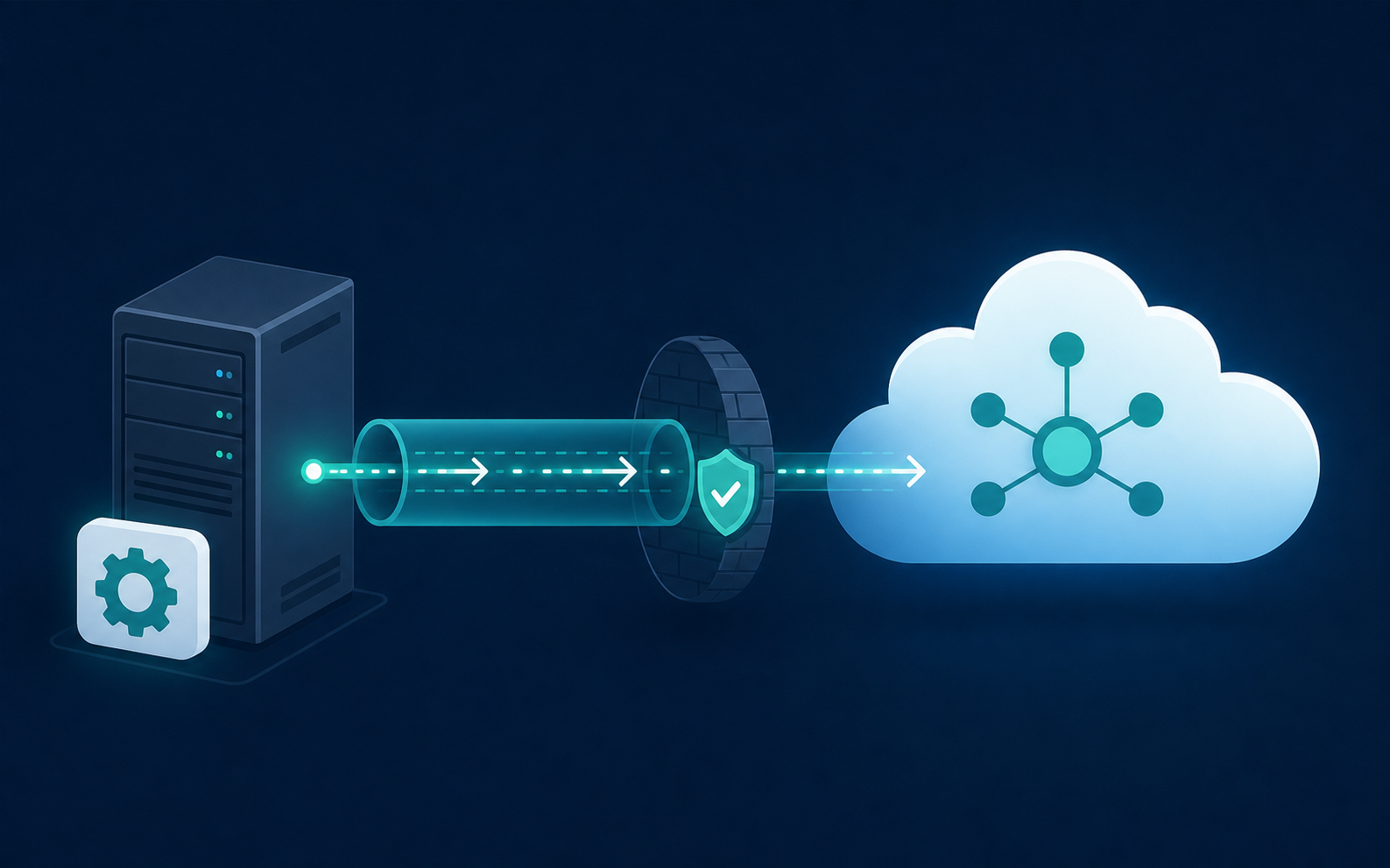
That last point is where most SaaS engineering teams underestimate the work. On-prem connectors are a categorically different problem than writing API integrations, a reminder of why ERP integrations are harder, and the failure mode is silent data gaps instead of visible errors.
Build vs. Buy: Choosing How to Deliver Construction Integrations
Building integrations in-house feels controllable until you price it out. A single connector runs $50,000 to $200,000 and takes 3 to 6 months to ship, before a single API change forces a rebuild. Construction accounting systems are especially prone to this: Sage and QuickBooks Desktop release updates on their own schedule, and your connector breaks on theirs. (Nobody warned you that shipping software would involve so much unscheduled demolition.)
The ongoing maintenance load is what kills in-house builds long-term. APIs change, authentication methods rotate, and every new customer variation (different QuickBooks version, different Sage configuration) requires another round of engineering. That's roadmap capacity that never comes back.
Build in-house when the integration is genuinely proprietary, meaning something specific to your product's data model that no third-party connector would cover. Buy when the connectors are standard (QuickBooks, Sage, ADP) and your engineers are already stretched across core product work. The math usually favors buying faster than product teams expect.
How Embedded Integrations Work in a Construction Tech Product
When a contractor opens your SaaS product and connects their accounting system, the experience should feel like a settings toggle, not an IT project. That's the promise of embedded integrations: the complexity lives in the infrastructure, not in the user's hands.
Here's what the flow looks like in practice. The contractor clicks "Connect Accounting System" inside your product. A widget appears, scoped to your product's branding, and walks them through credential entry or OAuth. Once authenticated, the connector begins syncing job costs, budgets, or invoices on a schedule you define. The contractor never leaves your product, never touches a CSV, and never calls your support team asking why their data is missing.
Behind the scenes, credential and session management are handled by the integration layer. For cloud systems like QuickBooks Online or NetSuite, that means OAuth tokens stored and refreshed automatically. For on-prem systems like Sage 300 CRE or QuickBooks Desktop, a lightweight agent installs on the customer's Windows machine and routes data out through a secure connection, similar to how the QuickBooks Desktop Web Connector handles polling-based syncs. The user experience looks the same either way.
The key distinction from a point-to-point API script is state. A one-off script runs, pulls data, and forgets what it did. An embedded integration tracks what was synced, handles incremental updates, matches records across systems, and fails loudly instead of silently dropping rows. When Sage pushes a schema change, the connector handles it. Your engineering team doesn't get paged at midnight.
Authenticating and Connecting On-Premise Accounting Systems
Each on-prem accounting system has its own auth model, and they are not interchangeable.
For QuickBooks Desktop, the connection routes through the QuickBooks Web Connector, a Windows service that runs on the customer's machine and polls for sync requests. This is a core piece of integrating QuickBooks with your SaaS platform. Your SaaS product queues up a job, the Web Connector picks it up on its next cycle, and data flows out. The customer installs a small .qwc configuration file once, and the connection persists. No exposed API port, no inbound traffic to their server.
Sage 300 CRE works differently. A lightweight agent installs directly on the customer's on-premise server and reads from Sage's tables directly, making it resilient to Sage software updates that would break an API-layer connector. The contractor notices nothing.
Sage 200, common in UK-based construction operations, takes a third path: a cloud proxy sits between the on-prem installation and your integration layer, bridging the gap without requiring inbound firewall rules on the customer's end. This is a different approach than the Sage 300 connector uses for direct database access.
Each method exists because the underlying system forces it. QuickBooks Desktop has no queryable local API, so you route through its own connector protocol. Sage 300 CRE's database is accessible but fragile to middleware, so direct database access with a resilient agent wins. Sage 200 needs a proxy because its on-prem footprint makes direct cloud-to-server connections impractical.
Mapping Construction-Specific Data: Job Codes, Cost Codes, and Fiscal Calendars
Construction accounting data is not shaped like generic accounting data, and that gap is where integrations break in production.
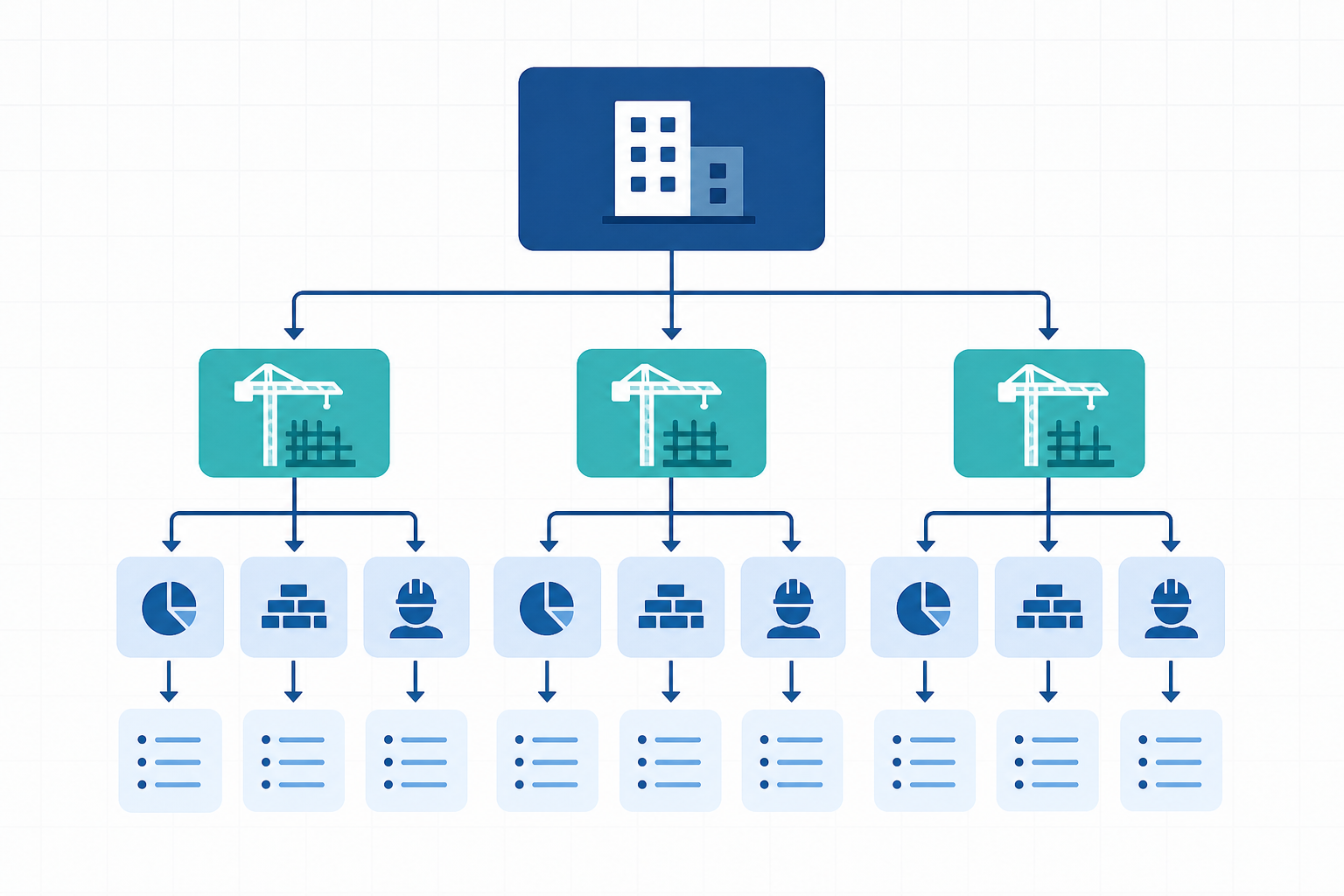
Job codes in Sage 300 CRE carry hierarchical cost structures (phases, categories, and sub-jobs) that don't map to a standard accounts payable object. QuickBooks Desktop's Profit & Loss Detail reports have a nested format that differs from what QuickBooks Online returns, even when the underlying data represents the same transactions. Sage Intacct reporting periods and Sage 300 fiscal calendar data need to land in your product with the right temporal context, or job cost comparisons become meaningless. A connector that syncs raw records without reshaping them into your product's schema gives you noisy, unusable data.
This is where the transformation layer decides whether your integration ships to production or stays stuck in demo. Hotglue's Python-powered transformation layer lets you write custom logic against the raw connector output before it reaches your backend, using Pandas for field reshaping, cost code normalization, or GL journal reconciliation. This is the same approach covered in importing CSV data into QuickBooks using Python. If writing that logic from scratch sounds slow, GluestickAI generates the Python from a plain-language description of what you need. Describe the mapping between Sage's phase-category hierarchy and your internal job cost schema, and it produces ready-to-run code you can edit and deploy.
Getting this layer right is the difference between a demo that impresses and an integration your customers trust with month-end close.
Configuring Sync Schedules and Managing Reliable Data Delivery
Sync frequency isn't one-size-fits-all in construction. You might want Sage 300 CRE to sync nightly during job close, but QuickBooks Desktop to run hourly during active billing cycles. Hotglue supports cron-based scheduling configurable per connector, so each integration runs on its own cadence within the same deployment.
For ad hoc needs, you can trigger a manual one-time sync without touching the schedule. If a contractor just entered a batch of change orders and needs them reflected before an owner meeting, your team can fire a sync on demand through the API without waiting for the next scheduled run.
Scoping what gets fetched matters too. Hotglue lets you pass per-job filter overrides directly in the sync request, so a single run can fetch only the cost codes updated in the last 48 hours instead of pulling the full dataset, a filtering option also available on the NetSuite connector. On large Sage 300 deployments, that difference in payload size is meaningful.
One reliability detail worth calling out plainly: a partial sync failure will never silently succeed. Either all data lands or the job fails, state is preserved, and the error is surfaced. For construction customers running month-end close against your product's numbers, silent data gaps aren't a minor inconvenience.
How hotglue Powers Embedded Integrations for Construction Tech SaaS
Hotglue was built for exactly the integrations that cloud-only tools skip. The Sage 300 CRE connector installs directly on-premise and reads from the local database, staying resilient to Sage software updates. QuickBooks Desktop connects via a Windows agent and the QuickBooks Web Connector, handling multi-user environments that most embedded iPaaS providers don't touch. That on-prem depth is a genuine differentiator in construction, where legacy accounting software is still the rule.
Beyond the on-prem story, the connector catalog covers the full construction tech stack: Sage 100, QuickBooks Online, NetSuite, the Microsoft Dynamics on-premise connector, Acumatica, ADP, Paylocity, Salesforce, and ServiceChannel for facilities and work-order data. With 650+ open-source connectors, including the Microsoft Dynamics 365 Finance connector, the catalog is broad enough to cover most customer requests without a custom build. When something is missing, a new connector can be stood up in one to two weeks from API access.
The infrastructure runs at real scale: 38,000+ active tenants and roughly 10 billion records processed weekly. Hotglue is SOC 2 Type II certified and never stores customer data, which matters when your construction customers are syncing job costing and payroll records. Pricing is tenant-based, not volume-based, so costs scale predictably as you onboard contractors instead of spiking with payload size, a welcome contrast to providers facing QuickBooks's new API fees.
If you're a CPO or Head of Partnerships who needs to ship construction integrations without consuming your engineering roadmap, hotglue is the strongest option on the market — on-prem connectors included, transformation layer ready, and a team that can stand up a missing connector in one to two weeks. hotglue.com is where to start.
Final thoughts on Why Construction Integrations Require More Than a Standard API Connector
Most embedded integration tools are built for SaaS-to-SaaS connections, which leaves a real gap for construction tech products where on-prem accounting systems are still running the show. Your customers are not going to move off Sage 300 CRE or QuickBooks Desktop to make your product work, so the integration layer has to go to them. The transformation work, job codes, cost hierarchies, fiscal calendars, is where production integrations succeed or fail, and that part deserves more attention than most product teams give it early on. Book a demo with hotglue to see how the on-prem connectors and transformation layer work together.
FAQ
How do I add a Sage 300 CRE integration to my construction SaaS product?
Sage 300 CRE has no hosted API endpoint, so standard cloud iPaaS tools skip it entirely. The right approach is a connector that installs directly on the customer's on-premise server, reads from Sage's local database, and stays resilient when Sage pushes software updates. Hotglue's Sage 300 CRE connector works exactly this way: the contractor installs a lightweight agent once, and your product syncs job costs, fiscal calendar data, and GL records without the contractor ever touching an export file.
What does embedded ETL mean, and how is it different from a traditional iPaaS for construction SaaS products?
An embedded ETL sits inside your product: your contractors connect their accounting systems through a widget in your UI, and the integration layer handles auth, syncing, record-matching, and transformation behind the scenes. A traditional iPaaS is a separate tool your team operates, not something your end users experience natively. For construction tech, the distinction matters because on-prem systems like Sage 300 CRE and QuickBooks Desktop require transformation logic (reshaping job codes, cost code hierarchies, fiscal periods) before the data is usable in your schema. That transformation layer is what makes embedded ETL different from a simple API connector.
Can I sync payroll data from ADP or Paylocity into my construction SaaS product without building a dedicated integration?
Yes, both ADP and Paylocity are available as pre-built connectors, so you don't need a dedicated integration engineer to ship them. For construction, payroll sync is more complex than it looks: prevailing wage, union classifications, and certified payroll reporting mean the raw data needs to land in the right shape for job costing to work. Hotglue's Python-powered transformation layer lets you write normalization logic against the raw connector output, or use GluestickAI to generate that code from a plain-language description of your field mapping.
Hotglue vs. building Sage and QuickBooks Desktop connectors in-house for construction tech?
Building in-house gives you control on day one and a maintenance burden that compounds over time. A single connector runs $50,000 to $200,000 and 3 to 6 months to ship, and Sage and QuickBooks Desktop both release updates on their own schedule, so your connector breaks on theirs. Hotglue's on-prem connectors are already built, actively maintained when third-party APIs change, and covered by a team that can stand up a new connector in 1 to 2 weeks from API access. For accounting integrations that aren't proprietary to your product's data model, the build-in-house math rarely holds up past year one.
How does Hotglue's per-tenant pricing hold up as a construction SaaS company scales its contractor base?
Pricing is based on active tenants in a 30-day rolling window, not data volume, so a large Sage 300 sync doesn't cost more than a small one. A single contractor connecting to multiple systems (Sage 300 CRE plus Paylocity, for example) counts as one tenant, not two. Hotglue's pricing is structured to stay under 10% of your MRR as you grow, which means costs scale with revenue instead of spiking with payload size, a real consideration in construction, where job close periods can send sync volumes well above baseline.