Setting up a NetSuite integration across multiple subsidiaries feels straightforward until the subsidiary scoping starts causing problems. Customer records, GL accounts, and journal entry lines all carry their own entity context, and a mismatch anywhere in that chain can create reconciliation headaches that take weeks to surface, usually right before a board presentation. Here's a breakdown of where things go wrong and what your validation logic actually needs to cover.
TLDR:
- NetSuite scopes every record to a subsidiary, so missing that context on writes silently posts transactions to the wrong entity's books
- Subsidiary mapping must be finalized before any sync code runs; restructuring it after transactions exist requires clearing all related history first
- Each journal entry line needs its own subsidiary ID, GL account, and currency or the entry fails validation or creates an imbalance at close
- Run pre-flight checks outside NetSuite for open periods, customer-subsidiary assignment, and GL accounts per line before touching the API
- hotglue handles per-subsidiary sync state so partial failures retry only what broke, without double-posting to subsidiaries that already succeeded
What NetSuite Multi-Subsidiary Architecture Actually Means
NetSuite OneWorld lets companies manage multiple subsidiaries, business units, and legal entities from a single ERP instance. Each subsidiary is its own distinct reporting and legal entity, with its own chart of accounts, base currency, and tax configuration. NetSuite supports 220 countries and territories, with 27 languages and 190 currencies built in.
The hierarchy matters here. Subsidiaries sit in parent-child trees, where a root subsidiary rolls up financials from children below it. Transactions, customers, and vendors are each scoped to specific subsidiaries in this tree.
When you are building an external integration, that scoping is baked into NetSuite's data model at a fundamental level. Every record you create or read carries a subsidiary context whether you planned for it or not. You are syncing into several parallel namespaces that share an ERP but behave like separate books. Building a NetSuite connector that accounts for this scoping is the foundation of any reliable integration.
The Multi-Subsidiary Customer Feature: What It Does and What It Does Not
NetSuite's Multi-Subsidiary Customer feature lets you associate a single customer record with more than one subsidiary. One subsidiary is designated as primary, and additional ones can be selected at the transaction line level. That primary assignment drives most default behavior: invoices, sales orders, and related transactions all default to the primary subsidiary unless you explicitly override them.
Where this gets tricky is the feature's limitations. Several gaps are worth knowing about before you build any integration logic on top of this feature:
- Tax information defaults only to the primary subsidiary and is ignored when a secondary is selected. Similar scoping rules apply when you build a QuickBooks connector for multi-entity customers.
- Messages, files, and notes on the customer record are visible only from the primary subsidiary context.
- Credit limits are not tracked per subsidiary.
- Bank account data is scoped to the primary subsidiary only.
For an integration layer, these gaps matter. You cannot assume a customer record validated against one subsidiary will behave correctly when a transaction targets another. Every write needs to carry subsidiary context explicitly, instead of relying on NetSuite's defaults to fill it in.
Why Customer Validation Breaks Across Entities
Subsidiary is a required field on most NetSuite transactions. When an external system pushes a customer record or journal entry without explicitly setting that field, one of two things happens: NetSuite rejects the request outright with a validation error, or it silently defaults to the primary subsidiary on the customer record. The silent default is worse. Your sync completes without errors, but the transaction lands in the wrong entity's books. If you're also considering integrating QuickBooks with your SaaS platform, many of the same silent-default pitfalls apply.
This gets especially painful during journal entry sync. Intercompany journal entries must be scoped to specific subsidiaries on each line. A mismatch between the customer's primary subsidiary and the subsidiary on the journal line will either throw an error or produce an out-of-balance entry that finance teams won't catch until month-end close.
How NetSuite Intercompany Journal Entries Work
When Subsidiary A records an expense paid on behalf of Subsidiary B, NetSuite auto-generates balancing lines using due-to and due-from accounts to keep each entity's books in balance independently. You do not manually create those offsetting entries; NetSuite handles the balancing automatically.
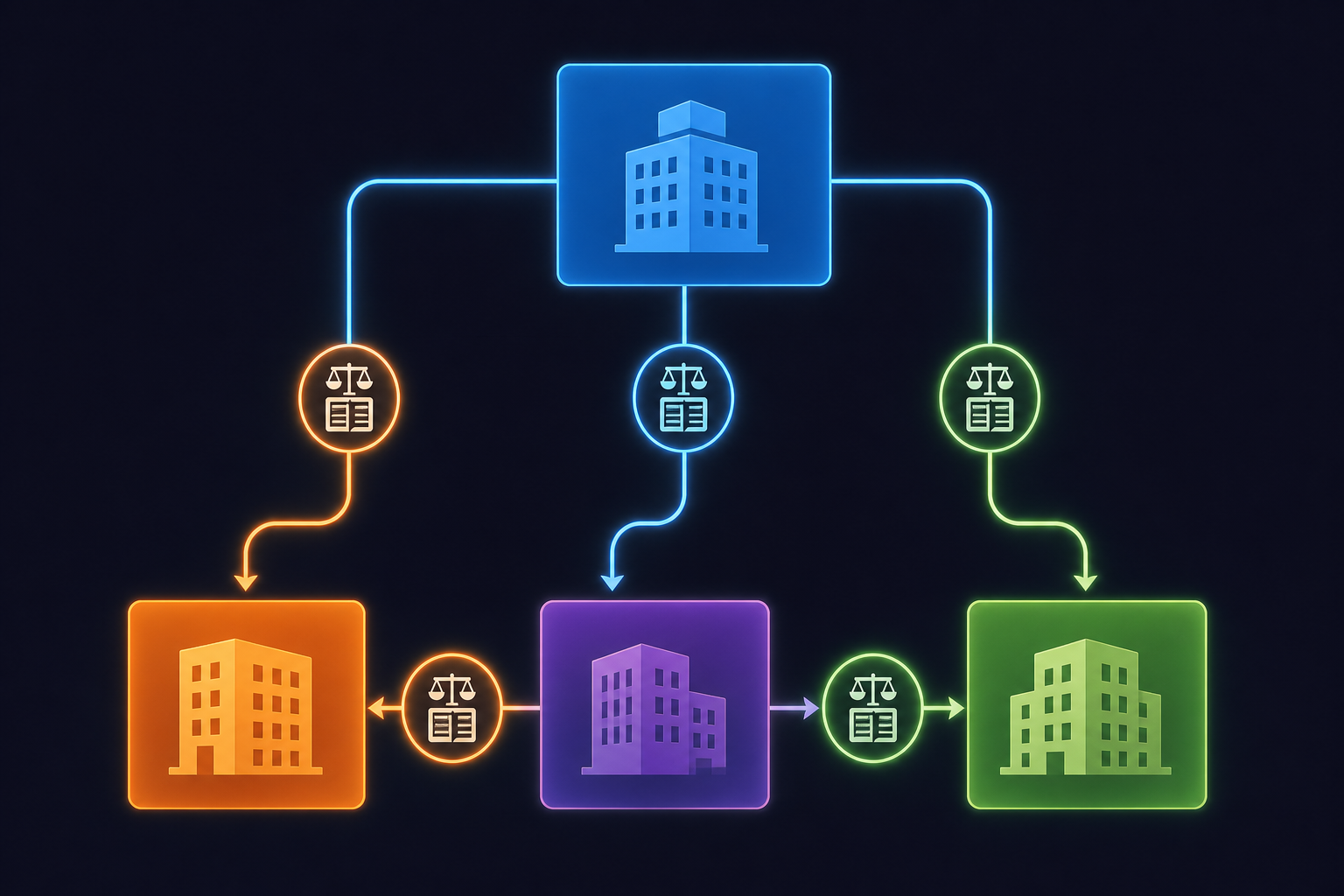
Every line on an intercompany journal entry carries its own subsidiary assignment, its own GL account, and its own currency context. A single journal entry can touch three different subsidiaries across five lines. A unified accounting API normalizes these differences so your product doesn't have to handle each ERP's quirks in isolation. During period-end close, finance teams review the due-to/due-from balances across entities and eliminate them in consolidated reporting.
For an integration syncing journal entries from an external system, this is where things get precise. You need the correct subsidiary on each line, the correct intercompany GL accounts for that subsidiary pair, and the right currency. Get any one of those wrong and the entry either fails validation or creates an imbalance that survives until someone runs a consolidation report and spots it.
Subsidiary Mapping: The Pre-Integration Decision You Cannot Undo
Before writing a single line of sync code, you need a complete map of which external entities correspond to which NetSuite subsidiary IDs. This is not something you can patch later.
The mapping covers at minimum:
- Customers and vendors to their primary (and any secondary) subsidiaries
- Chart of accounts, since GL accounts are scoped per subsidiary and the same account code can resolve differently across entities
- Cost centers and departments tied to specific subsidiaries
- Currency codes, where a subsidiary's base currency determines how exchange rates apply to transactions
Getting this wrong after transactions are posted is a genuine problem. Changing a customer's primary subsidiary after bookings are live requires reversing or deleting every transaction tied to the secondary subsidiaries first, then removing those secondary assignments, before any structural change is possible. As the NetSuite documentation notes, disabling or restructuring the Multi-Subsidiary Customer setup has strict prerequisites around clearing existing transaction history.
Treat subsidiary mapping as a schema migration, not a configuration detail. Once transactions exist, the mapping is load-bearing. The same principle applies when you add a Microsoft Dynamics Business Central connector to a multi-ERP deployment.
Your integration design phase needs the subsidiary hierarchy documented and signed off by the NetSuite admin before anything syncs. Build a lookup table in your integration layer that resolves external entity IDs to NetSuite subsidiary internal IDs, and version it. That lookup is as important as the connector itself.
GL Account and Currency Mapping Across Subsidiaries
GL accounts in NetSuite are not global. Each subsidiary maintains its own chart of accounts, and an account that exists under Subsidiary A may not exist under Subsidiary B at all. When your integration pushes a transaction line targeting a GL account absent from the target subsidiary's chart, NetSuite returns a validation error with no automatic fallback.
A few patterns help here:
- Pull the chart of accounts per subsidiary at sync time, not once globally. Use the subsidiary filter in your accounts query so you only see accounts accessible to the target entity. A Sage 300 connector requires the same per-entity account scoping when customers run Sage alongside NetSuite.
- Build a fallback mapping table that defines a default GL account per transaction type per subsidiary. When the preferred account is missing, your integration falls back to the defined default instead of failing the job.
- Run a pre-flight check that validates each line's account against the target subsidiary's chart before anything reaches NetSuite's API.
Currency adds another layer. Each subsidiary has a base currency, and transactions posted in a foreign currency require an exchange rate. If your external system sends amounts in USD but the target subsidiary's base currency is EUR, NetSuite expects either a pre-converted amount or a valid exchange rate on the transaction. Leaving that field blank does not default gracefully.
Bank accounts carry the same scoping problem. As noted in NetSuite's feature limitations, bank account data is tied to the primary subsidiary only. References to a bank account on a transaction targeting a secondary subsidiary will not resolve automatically.
Validation Logic That Must Live Outside NetSuite
Before a single record touches NetSuite's API, your integration layer needs to catch what NetSuite will either reject or silently mishandle. This is typically owned by the engineering team responsible for the integration, in close coordination with the NetSuite admin who controls subsidiary structure and period-close schedules. Finance teams rarely uncover these gaps on their own until month-end. Here is the minimum validation set:

| Pre-flight Check | What to Validate | Failure Mode if Skipped |
|---|---|---|
| Subsidiary exists & accessible | Target subsidiary ID is valid and your integration credentials have access to it | Permission error that looks identical to a missing record error |
| Customer-to-subsidiary assignment | Customer record has the target subsidiary assigned as primary or secondary | Transaction writes fail outright |
| Posting period is open | Accounting period is open for the target subsidiary (each subsidiary can have its own close schedule) | NetSuite rejects the transaction; period close schedules differ per entity |
| Currency active on subsidiary | Transaction currency is active for the target entity and not just at the global level | Silent mis-posting or validation error on foreign-currency transactions |
| GL accounts exist per line | Each transaction line's GL account exists in the target subsidiary's chart of accounts | Validation error with no automatic fallback; run per line, not per transaction header |
Security controls matter here too. hotglue's SOC 2 Type II compliance covers the audit requirements that come with handling multi-entity financial data. hotglue never stores customer integration payloads; data is processed and delivered directly, which matters when finance teams and auditors start asking questions about where intercompany transaction data has been.
The harder case is when the source system sends a record with no subsidiary signal at all. Defaulting to the primary subsidiary is tempting but dangerous. A better approach is to fail the record to a quarantine queue, flag it for review, and let your sync continue with the clean records. Silent defaults create reconciliation problems that surface weeks later, and a hard stop with a clear error is always faster to fix.
Incremental Sync and State Management in Multi-Subsidiary Setups
Running incremental sync against a single NetSuite subsidiary is straightforward enough. Running it across several subsidiaries simultaneously is where state management gets complicated, and where engineering teams start sending apologetic Slack messages to finance at 11pm on a Monday.
NetSuite's SuiteQL and REST APIs both accept subsidiary filters, so you can scope queries to a specific entity instead of pulling every record across the entire OneWorld instance. Do this. A query without a subsidiary filter on a large instance returns records from all accessible entities, which balloons payload size and makes it nearly impossible to attribute changes to the right entity downstream. If you're weighing infrastructure options, reviewing Workato alternatives for SaaS embedding can help frame the build-vs-buy decision. The core question is whether your team wants to own subsidiary filter logic, watermark management, and API maintenance for every connector, or offload that infrastructure to a platform that already handles it. For most B2B SaaS teams, the hidden cost of maintaining that per-subsidiary query logic across multiple ERPs is what tips the calculation toward an embedded iPaaS.
For incremental sync, each subsidiary needs its own watermark. A shared "last synced" timestamp across entities will cause you to miss records in subsidiaries that updated between runs, or pull redundant data from ones that did not. Treat each subsidiary as a separate sync channel with independent state.
Partial failure in a multi-entity context has a specific meaning worth calling out. If your sync job processes Subsidiary A successfully and then fails midway through Subsidiary B, you cannot simply retry the full job. Subsidiary A's watermark has already advanced, so retrying from the start double-posts to A. The safer pattern is to checkpoint state per subsidiary within a single job run, so a failure in one entity picks up from that entity's last confirmed position without replaying successful ones.
Hotglue handles this at the job level. Partial sync failures never silently succeed, and state is preserved per run so retries are scoped to what actually failed, not the entire job.
How hotglue Handles NetSuite Multi-Subsidiary Integrations
The Python-powered transformation layer is where subsidiary logic lives before anything reaches NetSuite's API. Teams encode their subsidiary lookup tables, GL account fallback rules, and currency validation directly into transformation scripts. When a source record arrives without a subsidiary signal, the script routes it to a quarantine queue instead of defaulting silently. When a GL account is missing from the target subsidiary's chart, the fallback mapping kicks in. That logic runs consistently across every tenant in your deployment, including the edge cases your QA team may not have covered.
For accounting automation products, hotglue supports NetSuite journal entry sync alongside Sage Intacct general ledger journal data. Rillet runs Paylocity and Airbase integrations through hotglue with bidirectional sync and journal entry automation. The connector handles per-line subsidiary context, intercompany account pairing, and currency fields that make journal entry sync precise.
Pricing That Scales With Multi-Subsidiary Deployments
Scaling across dozens of customer tenants is where pricing architecture matters. hotglue's tenant-based pricing means adding a new customer, even one with five subsidiaries, does not create unpredictable infrastructure costs. One tenant connecting to multiple connectors counts as one tenant. Tipalti runs bidirectional AP sync at scale through hotglue, and hotglue processes approximately 10 billion records weekly across 38,000+ active tenants. See how Cashboard AI's FP&A integrations unlocked enterprise deals as a real-world example of this scale.
For finance teams handling intercompany data, the data handling model matters as much as the connector logic. hotglue processes and delivers data without storing customer integration payloads, and is SOC 2 Type II and GDPR compliant, which satisfies the audit requirements that come with multi-entity financial data moving across an integration layer.
Final Thoughts on NetSuite Multi-Subsidiary and Journal Entry Sync
The thing that catches most teams off guard with NetSuite multi-subsidiary integration is how much of the complexity lives outside NetSuite itself. Your validation logic, subsidiary lookups, and GL account fallback rules all need to exist in your integration layer before anything touches the API. That's exactly where hotglue shines: a Python-powered transformation layer, per-subsidiary sync state, quarantine queues for bad records, and SOC 2 Type II compliance, so your engineers spend their time building your product, not babysitting ERP edge cases. Book a quick demo with hotglue to see how that layer gets built without starting from scratch.
FAQ
How does Hotglue handle GL account mapping when a target subsidiary doesn't have the expected account in its chart?
Hotglue's Python transformation layer runs a pre-flight check that validates each transaction line's GL account against the target subsidiary's chart before anything reaches NetSuite's API. When an account is missing, a fallback mapping table routes the line to a defined default account for that transaction type and subsidiary, so the job doesn't fail silently: it either applies the fallback or flags the record for review.
What happens in a NetSuite journal entry sync when required subsidiary or currency metadata is missing from the source record?
When a source record arrives without a subsidiary signal, the correct behavior is to route it to a quarantine queue and continue syncing the clean records, not default silently to the primary subsidiary. Hotglue's transformation scripts encode this logic explicitly: missing subsidiary context fails fast with a clear error instead of producing a mis-booked entry that finance teams catch at month-end close.
How do you handle incremental sync state across multiple NetSuite subsidiaries without double-posting?
Each subsidiary needs its own independent watermark, not a shared "last synced" timestamp across the whole OneWorld instance. If a job processes Subsidiary A successfully and fails midway through Subsidiary B, retrying from the start would double-post to A. Hotglue checkpoints state per subsidiary within a single job run, so retries pick up from the exact failure point without replaying completed entities.
What is NetSuite multi-subsidiary customer validation and why does it break integrations?
NetSuite's Multi-Subsidiary Customer feature lets a single customer record span multiple subsidiaries, but subsidiary is a required field on most transactions. If your integration doesn't set it explicitly, NetSuite either rejects the request or silently defaults to the primary subsidiary. That silent default is the dangerous path: the sync completes without errors, but the transaction lands in the wrong entity's books, creating reconciliation gaps that don't surface until period-end close.
Should I build NetSuite multi-subsidiary integration logic in-house or use an embedded iPaaS like Hotglue?
Building in-house means your team owns every edge case: per-subsidiary GL account validation, intercompany journal entry line scoping, currency mapping, watermark state per entity, and ongoing API maintenance as NetSuite's endpoints evolve. Hotglue handles all of that at the connector level, with a Python transformation layer where you encode your subsidiary lookup tables and fallback rules once and they run consistently across every customer tenant, so your engineers never have to rebuild the same logic for each new deployment.